Habitat Furniture Website Redesign


I redesigned a modern furniture e-commerce website to improve usability, ensure visual consistency, and deliver a smoother, more trustworthy shopping experience. The goal was to create a clean, premium interface that reflects the brand's identity while enabling users to browse, compare, and purchase products confidently.
A standout feature is the AI-powered product visualization tool, which allows customers to preview items virtually in their own homes. This enhancement significantly reduced hesitation and empowered users to make faster, more informed purchase decisions.
Case Summary
Problem
The current Habitat website lacks clear structure, consistent visual hierarchy, and intuitive navigation. Users struggle to compare products, understand key details, and visualize items in their space, resulting in low confidence and slower decision-making. Limited contextual information and weak trust signals further create friction in the shopping experience.
Solution
I redesigned the website with clearer information architecture, simplified navigation, and consistent visuals to create an intuitive shopping experience. Users can compare selected products and use an AI-powered visualization tool to see items in their space, boosting confidence and speeding up decisions. Post-redesign usability tests showed improved task completion, engagement, and user satisfaction.
My Role
As the UX/UI Designer, I led the full redesign process—from user research and usability testing to wireframing, interface design, and high-fidelity prototyping. I collaborated with stakeholders to align business goals, analyzed user behavior to identify friction points, and created a more intuitive, visually cohesive shopping experience, including the AI-powered product visualization feature.
Duration: 3 months
Case Summary
Problem
The current Habitat website lacks clear structure, consistent visual hierarchy, and intuitive navigation. Users struggle to compare products, understand key details, and visualize items in their space, resulting in low confidence and slower decision-making. Limited contextual information and weak trust signals further create friction in the shopping experience.
Solution
I redesigned the website with clearer information architecture, simplified navigation, and consistent visuals to create an intuitive shopping experience. Users can compare selected products and use an AI-powered visualization tool to see items in their space, boosting confidence and speeding up decisions. Post-redesign usability tests showed improved task completion, engagement, and user satisfaction.
My Role
As the UX/UI Designer, I led the full redesign process—from user research and usability testing to wireframing, interface design, and high-fidelity prototyping. I collaborated with stakeholders to align business goals, analyzed user behavior to identify friction points, and created a more intuitive, visually cohesive shopping experience, including the AI-powered product visualization feature.
Duration: 3 months
Why Habitat Needed a Redesign?
The research focused on the sofa purchase journey on Habitat's website, including product discovery, information clarity, comparison, and checkout processes. Target users included both first-time and returning customers looking to browse, select, and purchase sofas online. The study employed heuristic evaluation, usability testing, card sorting, and competitive benchmarking to uncover usability issues and improvement opportunities. Areas outside this scope included account management, mobile-specific flows, and customer support interactions.
Research Approach
To uncover key pain points, I conducted a structured research process combining:
- Heuristic evaluation of the existing site
- Usability testing on the sofa purchase flow
- Card sorting and task-flow analysis
- Competitive benchmarking of leading furniture retailers (IKEA, CB2, Article, West Elm)
- User interviews and early-stage testing
This comprehensive approach ensured that all design decisions were user-centered and data-informed.
Design Process – Double Diamond Framework
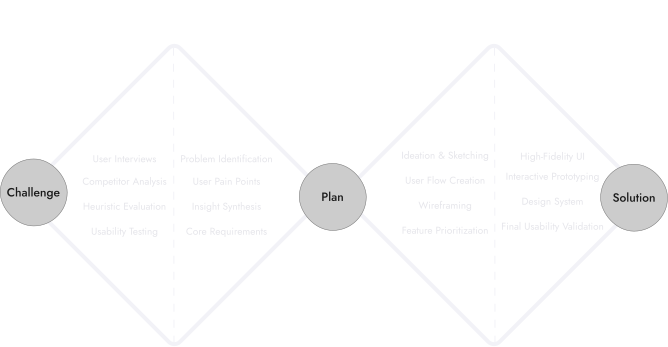
I applied the Double Diamond UX framework throughout the project to ensure a clear structure from initial research to the final delivery. This included user discovery, problem definition, ideation, and iterative design refinement.
Methods Used
To thoroughly understand user pain points and opportunities for improvement, I applied a combination of qualitative and quantitative research methods:
- Heuristic Evaluation: Reviewed the existing Habitat website to identify usability issues, visual inconsistencies, and navigation friction.
- Usability Testing: Conducted task-based tests on the current sofa purchase flow to observe pain points and measure efficiency.
- Card Sorting & Task-Flow Analysis: Validated information architecture and category labeling to ensure intuitive navigation.
- Competitive Benchmarking: Analyzed leading furniture websites (IKEA, CB2, Article, West Elm) for best practices in UX, UI, and product visualization.
- User Interviews & Surveys: Gathered direct feedback on preferences, expectations, and decision-making processes when shopping for sofas online.
These methods provided a holistic understanding of user behavior, uncovering both structural and interaction-focused opportunities that guided the redesign.
Why Habitat Needed a Redesign?
The research focused on the sofa purchase journey on Habitat's website, including product discovery, information clarity, comparison, and checkout processes. Target users included both first-time and returning customers looking to browse, select, and purchase sofas online. The study employed heuristic evaluation, usability testing, card sorting, and competitive benchmarking to uncover usability issues and improvement opportunities. Areas outside this scope included account management, mobile-specific flows, and customer support interactions.
Research Approach
To uncover key pain points, I conducted a structured research process combining:
- Heuristic evaluation of the existing site
- Usability testing on the sofa purchase flow
- Card sorting and task-flow analysis
- Competitive benchmarking of leading furniture retailers (IKEA, CB2, Article, West Elm)
- User interviews and early-stage testing
This comprehensive approach ensured that all design decisions were user-centered and data-informed.
Design Process – Double Diamond Framework
I applied the Double Diamond UX framework throughout the project to ensure a clear structure from initial research to the final delivery. This included user discovery, problem definition, ideation, and iterative design refinement.
Methods Used
To thoroughly understand user pain points and opportunities for improvement, I applied a combination of qualitative and quantitative research methods:
- Heuristic Evaluation: Reviewed the existing Habitat website to identify usability issues, visual inconsistencies, and navigation friction.
- Usability Testing: Conducted task-based tests on the current sofa purchase flow to observe pain points and measure efficiency.
- Card Sorting & Task-Flow Analysis: Validated information architecture and category labeling to ensure intuitive navigation.
- Competitive Benchmarking: Analyzed leading furniture websites (IKEA, CB2, Article, West Elm) for best practices in UX, UI, and product visualization.
- User Interviews & Surveys: Gathered direct feedback on preferences, expectations, and decision-making processes when shopping for sofas online.
These methods provided a holistic understanding of user behavior, uncovering both structural and interaction-focused opportunities that guided the redesign.
Website Analysis: Strengths and Weaknesses
Strengths / Opportunities
Habitat has strong brand recognition and a diverse product range, providing a solid base for redesign. Existing customization options—such as fabric, color, and size variations—offer valuable personalization potential if surfaced more clearly. With structured product details already in place, enhancing the information hierarchy, navigation, and filtering presents a strong opportunity to create a smoother, more intuitive shopping experience. High-quality imagery, clearer categories, and improved UI patterns can further elevate user trust and support confident decision-making.
Weaknesses / Risks
The current Habitat website presents several UX and UI issues that significantly impact usability, trust, and purchase confidence:
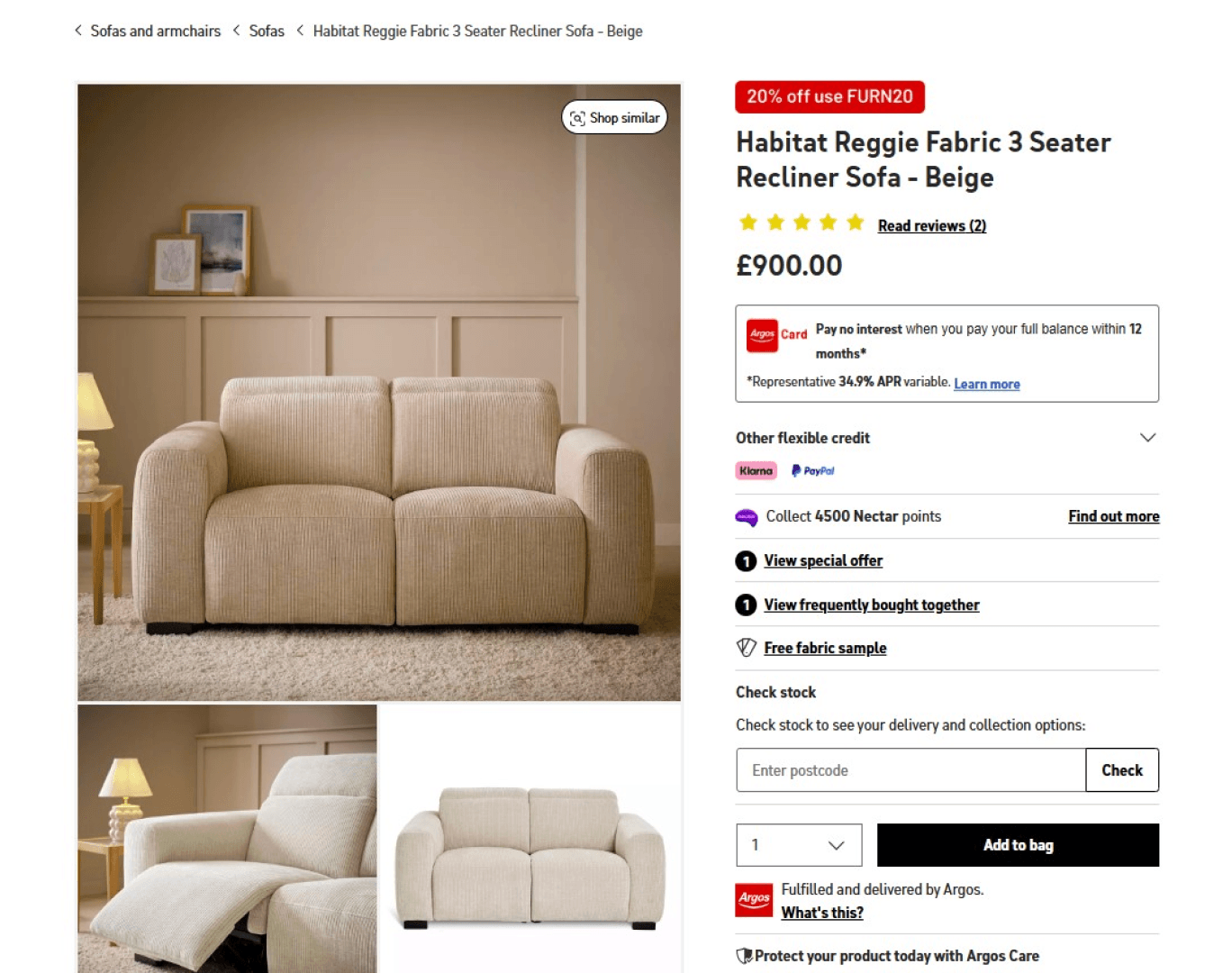
- Weak information architecture: Key categories such as major furniture items (e.g., sofas) are not clearly visible in the header, forcing users into unnecessary clicks and making product discovery difficult.
- Low-quality visual presentation: Product images are often small, low-resolution, and lack consistency, reducing both engagement and perceived product value.
- Poor homepage hierarchy: The hero section lacks visual impact, important content is not highlighted, and the overall layout does not guide users effectively into browsing or purchasing.
- Incomplete and scattered product information: Product pages provide limited details, unclear specifications, and inconsistent formatting, making comparison and decision-making challenging.
- Insufficient filtering and categorization: Filtering options are limited, categories are poorly structured, and the navigation does not support quick product exploration or narrowing down choices.
- Missing trust signals: Clear return policies, guarantees, care instructions, and transparent descriptions are not consistently communicated—reducing buyer confidence.
- Low brand trust and social proof: The site lacks verified customer reviews, ratings, testimonials, or case examples, all of which are critical for high-investment products like furniture.
- Delivery and fulfillment uncertainty: Delivery timelines, shipping costs, and Click & Collect availability are not clearly displayed, creating confusion during the purchase process.
- Unpromoted customization features: The made-to-order and personalization options are hidden or poorly communicated, preventing users from discovering a major value proposition.
- Visually inconsistent UI: Colors, spacing, and layout elements lack harmony, leading to a cluttered and unrefined user experience.
Multiple furniture e-commerce sites offer a great opportunity for competitive analysis, improving user needs and informing a better redesign.
To identify design opportunities, I analyzed leading furniture e-commerce websites, including Wayfair, IKEA, EQ3, HomeSense, and Etsy. I focused on their navigation, information architecture, product presentation, and overall usability. The analysis revealed gaps such as unclear product organization, limited visualization tools, inconsistent product details, and overly complex navigation. At the same time, it highlighted opportunities to improve user experience by introducing interactive product previews, streamlining browsing flows, emphasizing product quality, and enhancing visual consistency. These insights directly guided the redesign, informing decisions to create a more organized, informative, and visually engaging website.
User research uncovered one guiding question: What do users need to feel confident when purchasing furniture online?
Insights revealed three consistent barriers—unclear or incomplete product information, difficulty visualizing items in their own space, and a navigation flow that created friction rather than clarity. Users expressed a desire for a streamlined path to decision-making: simplicity without sacrificing detail, intuitive comparison tools, and support for shared household decisions. These findings shaped the redesign toward a more structured information hierarchy, enhanced product visualization powered by interactive tools, and a smoother, confidence-driven shopping journey.
Website Analysis: Strengths and Weaknesses
Strengths / Opportunities
Habitat has strong brand recognition and a diverse product range, providing a solid base for redesign. Existing customization options—such as fabric, color, and size variations—offer valuable personalization potential if surfaced more clearly. With structured product details already in place, enhancing the information hierarchy, navigation, and filtering presents a strong opportunity to create a smoother, more intuitive shopping experience. High-quality imagery, clearer categories, and improved UI patterns can further elevate user trust and support confident decision-making.
Weaknesses / Risks
The current Habitat website presents several UX and UI issues that significantly impact usability, trust, and purchase confidence:
- Weak information architecture: Key categories such as major furniture items (e.g., sofas) are not clearly visible in the header, forcing users into unnecessary clicks and making product discovery difficult.
- Low-quality visual presentation: Product images are often small, low-resolution, and lack consistency, reducing both engagement and perceived product value.
- Poor homepage hierarchy: The hero section lacks visual impact, important content is not highlighted, and the overall layout does not guide users effectively into browsing or purchasing.
- Incomplete and scattered product information: Product pages provide limited details, unclear specifications, and inconsistent formatting, making comparison and decision-making challenging.
- Insufficient filtering and categorization: Filtering options are limited, categories are poorly structured, and the navigation does not support quick product exploration or narrowing down choices.
- Missing trust signals: Clear return policies, guarantees, care instructions, and transparent descriptions are not consistently communicated—reducing buyer confidence.
- Low brand trust and social proof: The site lacks verified customer reviews, ratings, testimonials, or case examples, all of which are critical for high-investment products like furniture.
- Delivery and fulfillment uncertainty: Delivery timelines, shipping costs, and Click & Collect availability are not clearly displayed, creating confusion during the purchase process.
- Unpromoted customization features: The made-to-order and personalization options are hidden or poorly communicated, preventing users from discovering a major value proposition.
- Visually inconsistent UI: Colors, spacing, and layout elements lack harmony, leading to a cluttered and unrefined user experience.
Multiple furniture e-commerce sites offer a great opportunity for competitive analysis, improving user needs and informing a better redesign.
To identify design opportunities, I analyzed leading furniture e-commerce websites, including Wayfair, IKEA, EQ3, HomeSense, and Etsy. I focused on their navigation, information architecture, product presentation, and overall usability. The analysis revealed gaps such as unclear product organization, limited visualization tools, inconsistent product details, and overly complex navigation. At the same time, it highlighted opportunities to improve user experience by introducing interactive product previews, streamlining browsing flows, emphasizing product quality, and enhancing visual consistency. These insights directly guided the redesign, informing decisions to create a more organized, informative, and visually engaging website.
User research uncovered one guiding question: What do users need to feel confident when purchasing furniture online?
Insights revealed three consistent barriers—unclear or incomplete product information, difficulty visualizing items in their own space, and a navigation flow that created friction rather than clarity. Users expressed a desire for a streamlined path to decision-making: simplicity without sacrificing detail, intuitive comparison tools, and support for shared household decisions. These findings shaped the redesign toward a more structured information hierarchy, enhanced product visualization powered by interactive tools, and a smoother, confidence-driven shopping journey.
What am I building?
Research highlighted key opportunities to improve Habitat's shopping experience:
- Effortless product discovery: Streamline navigation, information architecture, and filtering for quick, intuitive browsing.
- Informed decisions: Provide specs, contextual visuals, and side-by-side product comparisons to reduce uncertainty.
- Enhanced visualization: Introduce in-space product previews to show scale, fit, and style in real environments.
- Smoother shopping flow: Simplify browsing, selection, and checkout to reduce friction.
- Consistent, intuitive UI: Use clean hierarchy, visual consistency, and guided patterns to make exploration enjoyable.
- Build trust: Highlight reviews, material quality, and delivery/return policies clearly.
- Smart recommendations: Suggest related items and alternatives to support confident decisions.
What am I building?
Research highlighted key opportunities to improve Habitat's shopping experience:
- Effortless product discovery: Streamline navigation, information architecture, and filtering for quick, intuitive browsing.
- Informed decisions: Provide specs, contextual visuals, and side-by-side product comparisons to reduce uncertainty.
- Enhanced visualization: Introduce in-space product previews to show scale, fit, and style in real environments.
- Smoother shopping flow: Simplify browsing, selection, and checkout to reduce friction.
- Consistent, intuitive UI: Use clean hierarchy, visual consistency, and guided patterns to make exploration enjoyable.
- Build trust: Highlight reviews, material quality, and delivery/return policies clearly.
- Smart recommendations: Suggest related items and alternatives to support confident decisions.
Translating insights into design
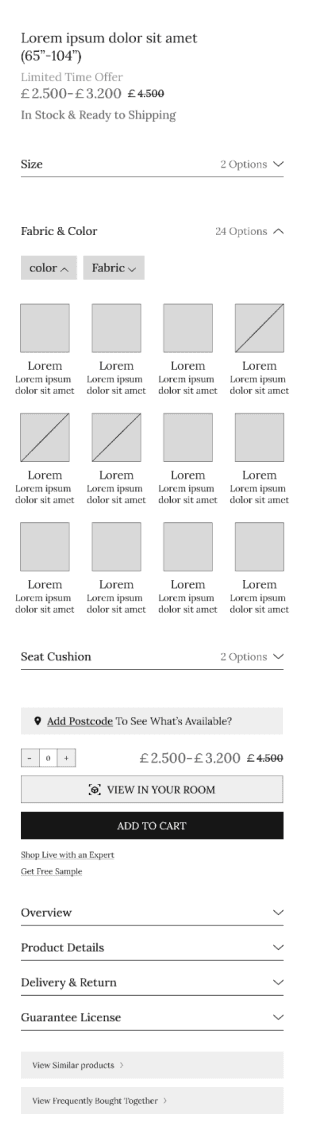
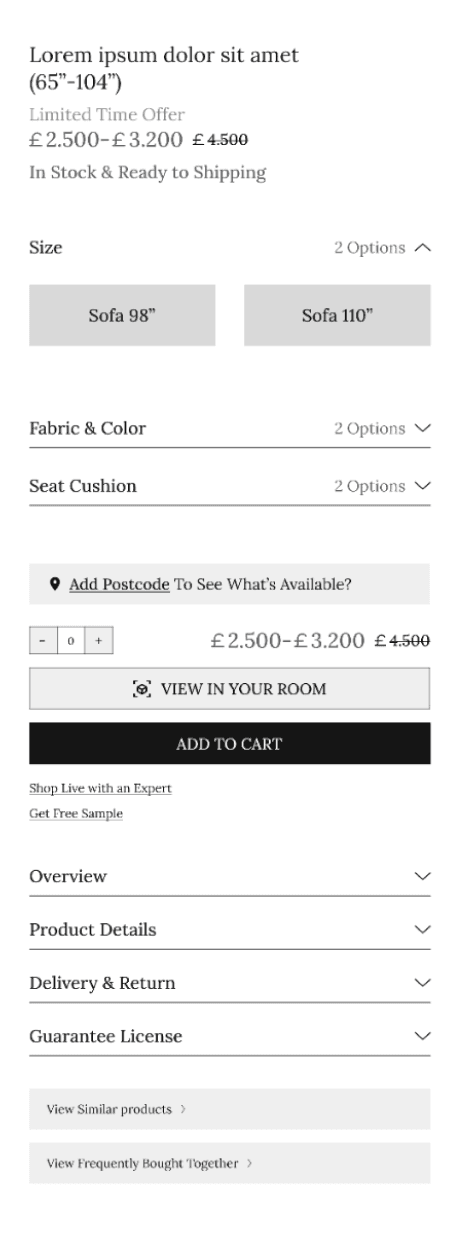
- Wireframes Overview (Refined Version)
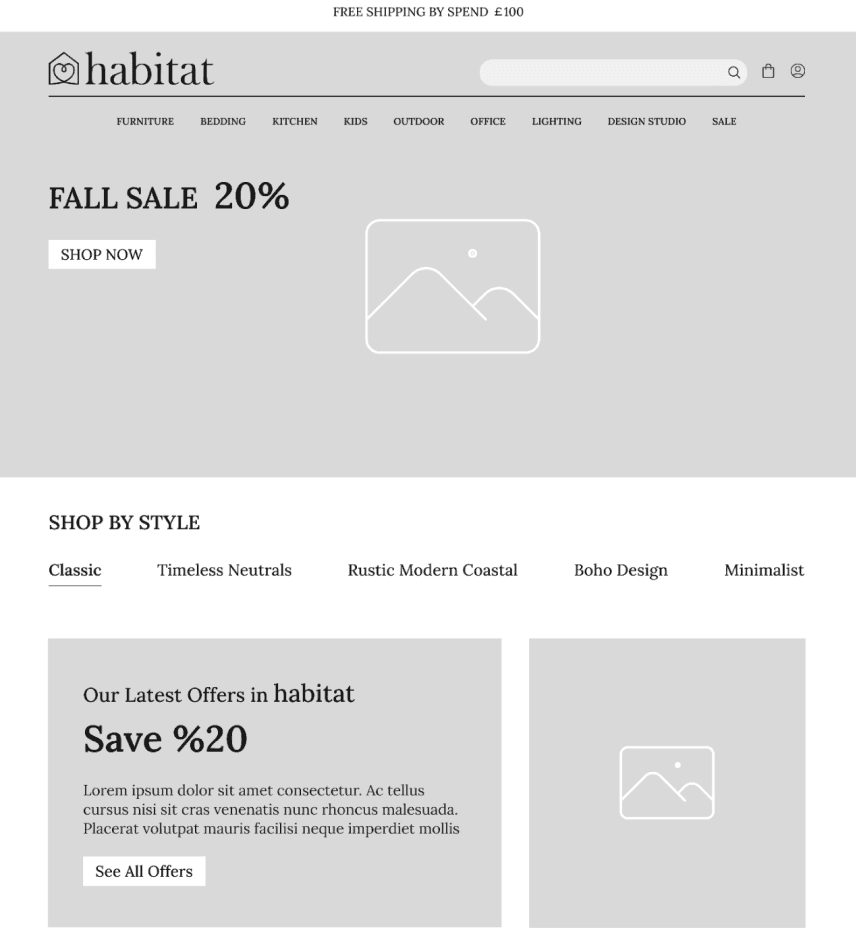
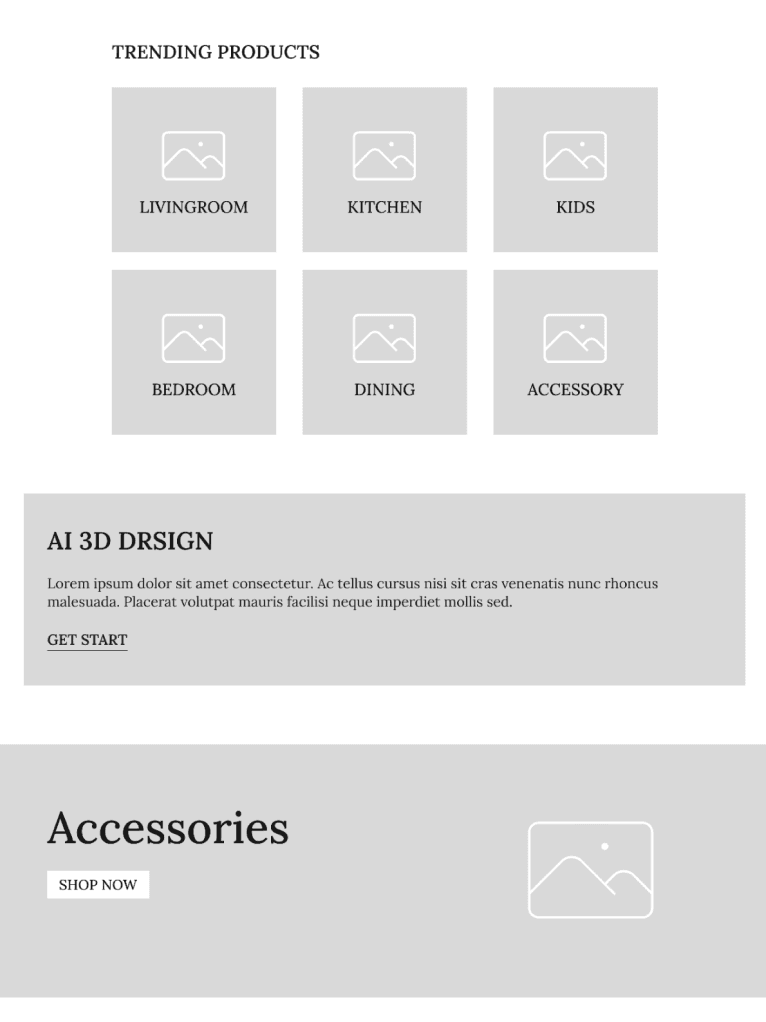
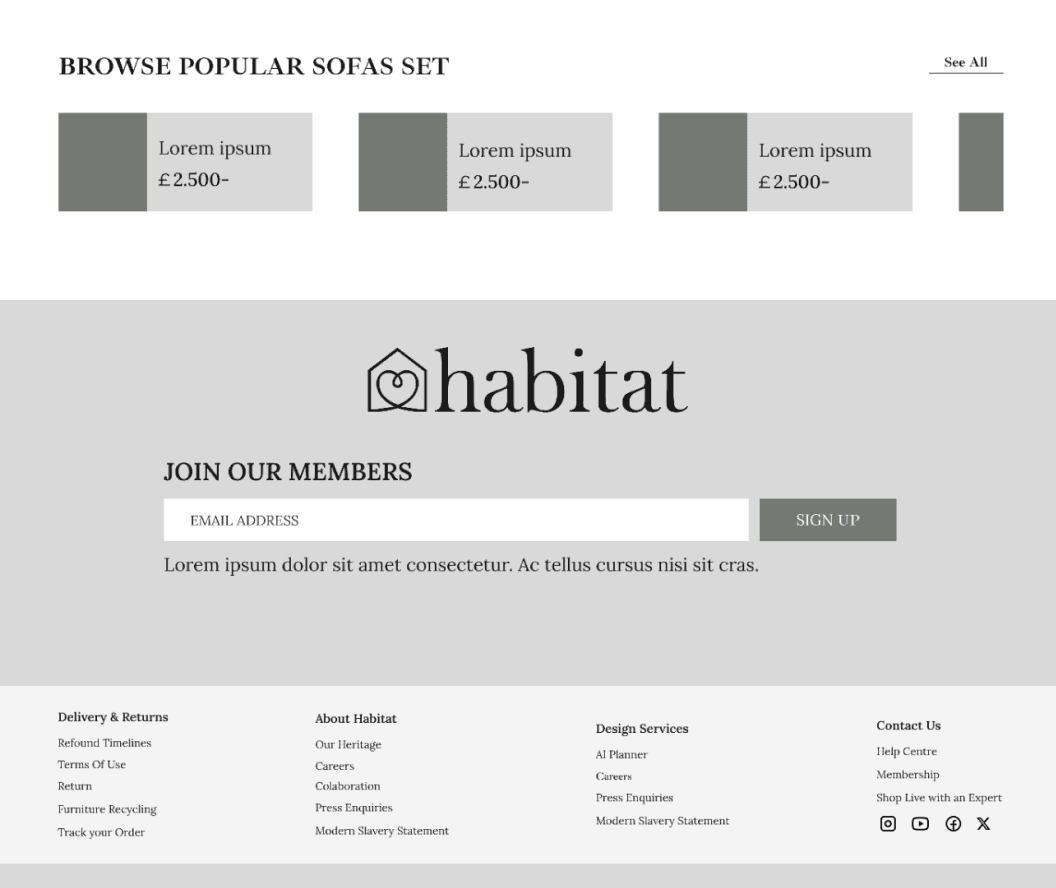
- Based on insights from the Habitat website, the redesign addresses key user pain points with clear, actionable improvements across the digital experience.
The information architecture and navigation were restructured for intuitive browsing and effortless product discovery.
An interactive AI-powered visualization lets users place furniture in their own space, boosting confidence and reducing purchase hesitation.
These wireframes showcase optimized product pages, checkout, and post-purchase flows—delivering a seamless, user-centered, and conversion-focused shopping journey.
Translating insights into design
- Wireframes Overview (Refined Version)
- Based on insights from the Habitat website, the redesign addresses key user pain points with clear, actionable improvements across the digital experience.
The information architecture and navigation were restructured for intuitive browsing and effortless product discovery.
An interactive AI-powered visualization lets users place furniture in their own space, boosting confidence and reducing purchase hesitation.
These wireframes showcase optimized product pages, checkout, and post-purchase flows—delivering a seamless, user-centered, and conversion-focused shopping journey.
Listening to users
Initial usability testing of the existing Habitat website revealed significant pain points. Users struggled to locate products, understand specifications, and compare items, resulting in slow decision-making and frustration. For example, task completion rates were low (≈50%), and users frequently missed key product details.
Based on these insights, the redesign introduced a clearer information hierarchy, simplified navigation, improved product imagery, side-by-side product comparison, and an AI-powered in-space visualization tool. Post-redesign usability tests showed substantial improvements: task completion increased by 30%, decision-making became faster, and overall user satisfaction rose noticeably. These results confirmed that the redesign effectively addressed user pain points, enhanced confidence, and streamlined the shopping experience.
Listening to users
Initial usability testing of the existing Habitat website revealed significant pain points. Users struggled to locate products, understand specifications, and compare items, resulting in slow decision-making and frustration. For example, task completion rates were low (≈50%), and users frequently missed key product details.
Based on these insights, the redesign introduced a clearer information hierarchy, simplified navigation, improved product imagery, side-by-side product comparison, and an AI-powered in-space visualization tool. Post-redesign usability tests showed substantial improvements: task completion increased by 30%, decision-making became faster, and overall user satisfaction rose noticeably. These results confirmed that the redesign effectively addressed user pain points, enhanced confidence, and streamlined the shopping experience.
Habitat Redesign – Insights & Actions
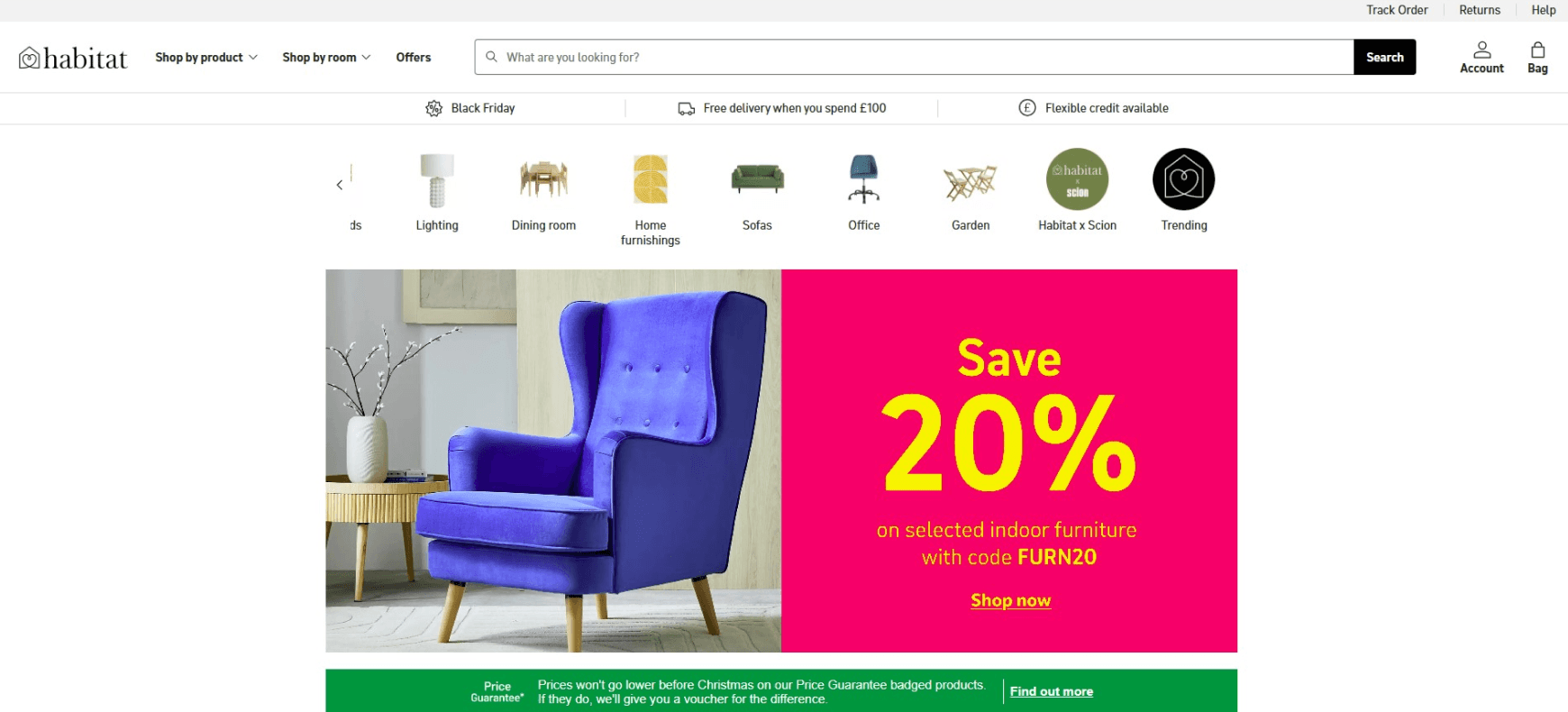
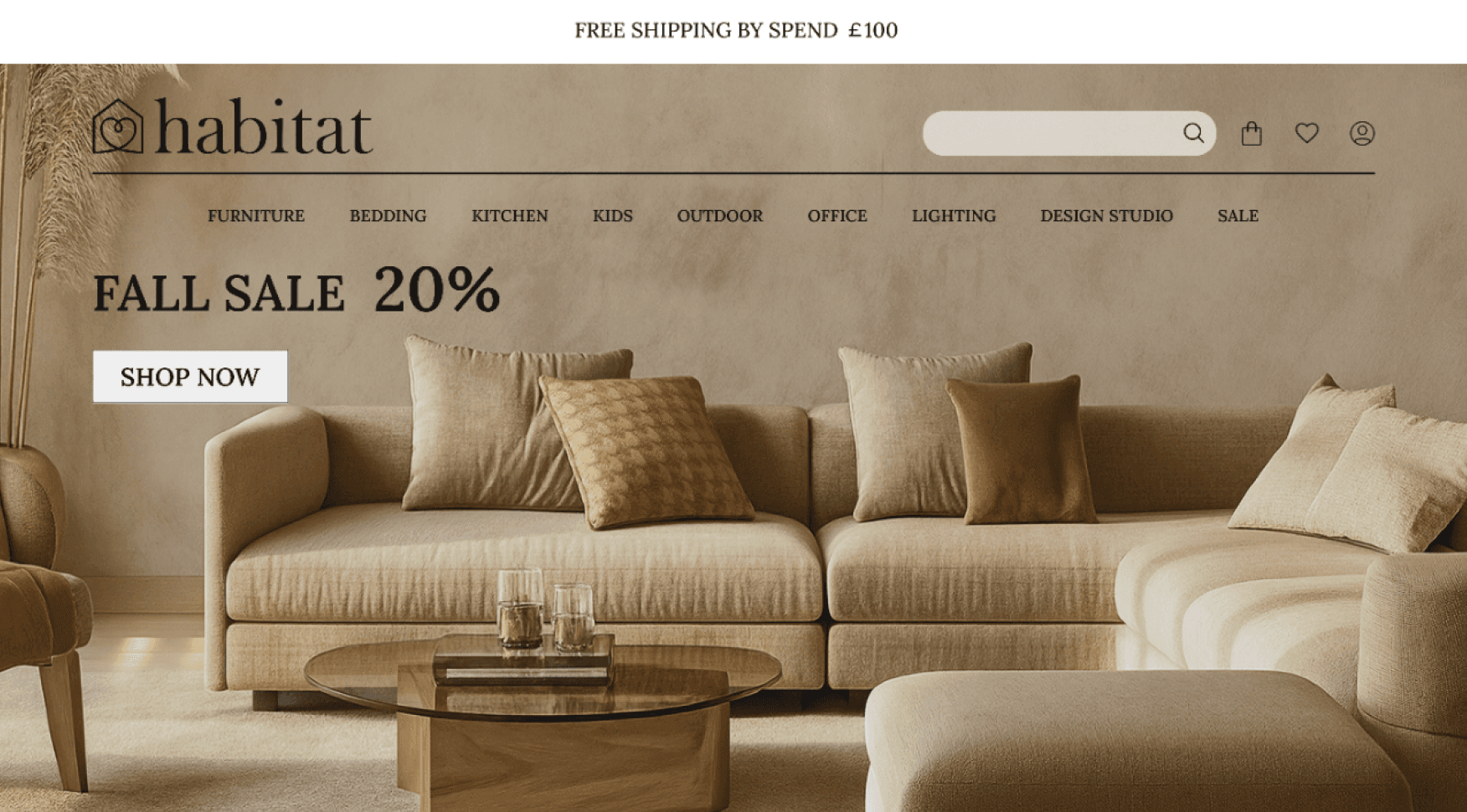
1. Stronger Hero Image & First-Point Engagement
- Insight: The homepage hero lacked visual impact, clarity, and meaningful entry points, causing users to scroll without direction.
- Action: Designed a bold, high-quality hero section featuring large imagery, clear value propositions, seasonal highlights, and direct CTAs.
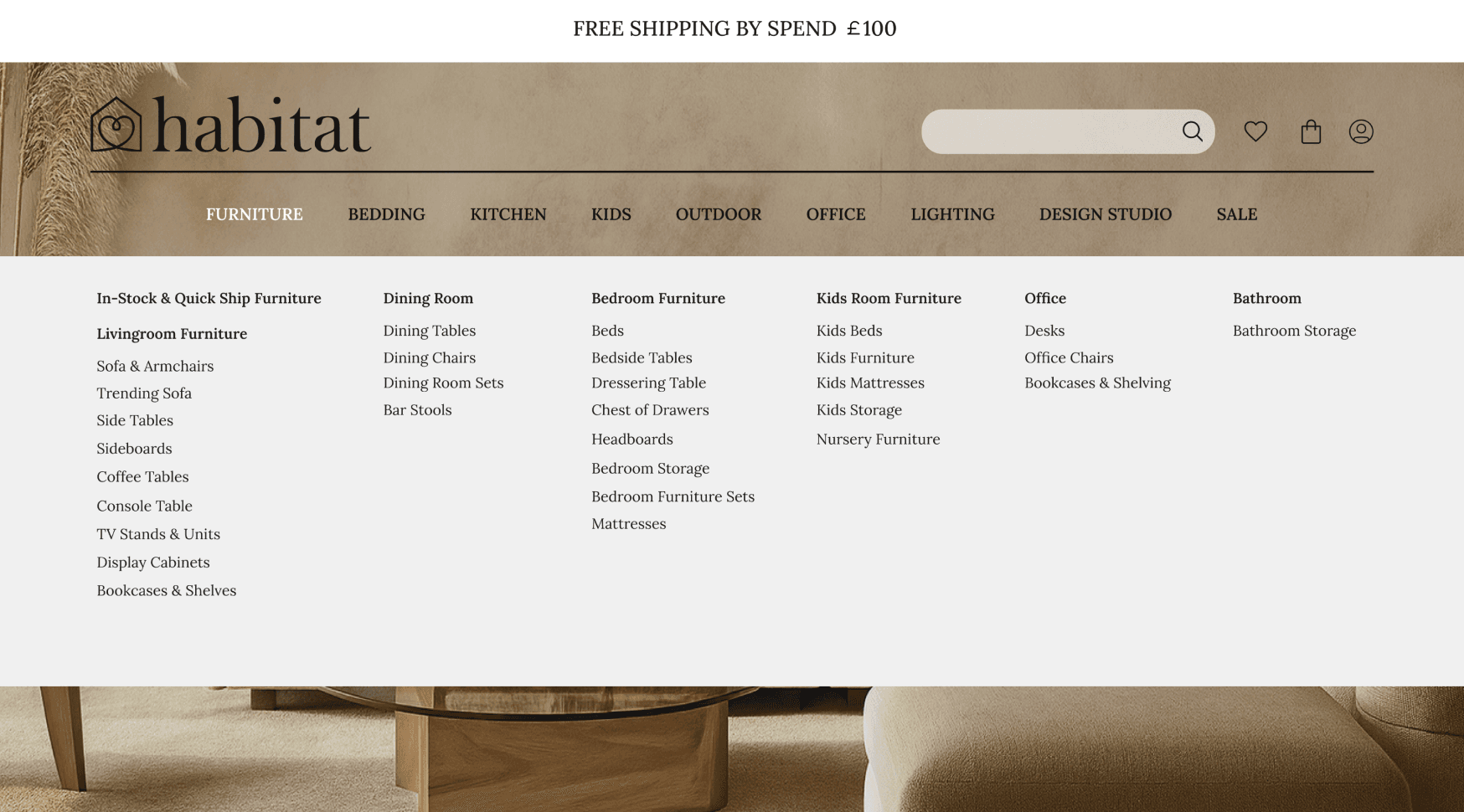
2. Clearer Information Architecture & Navigation
- Insight: Users struggled to locate essential categories, leading to confusion and long discovery times.
- Action: Rebuilt the header navigation with logical grouping, clearer labels, and a more intuitive category structure.
3. Enhanced Best Seller Offers & Trending Products Section
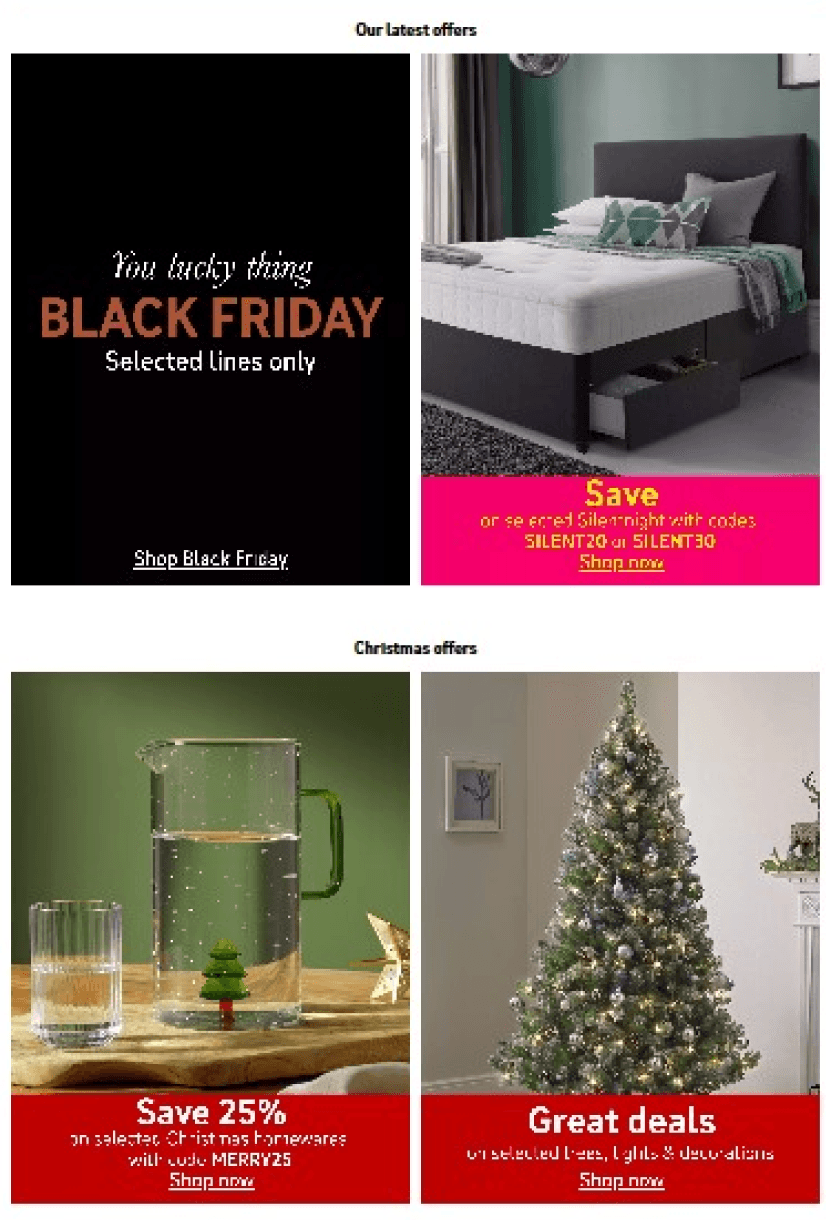
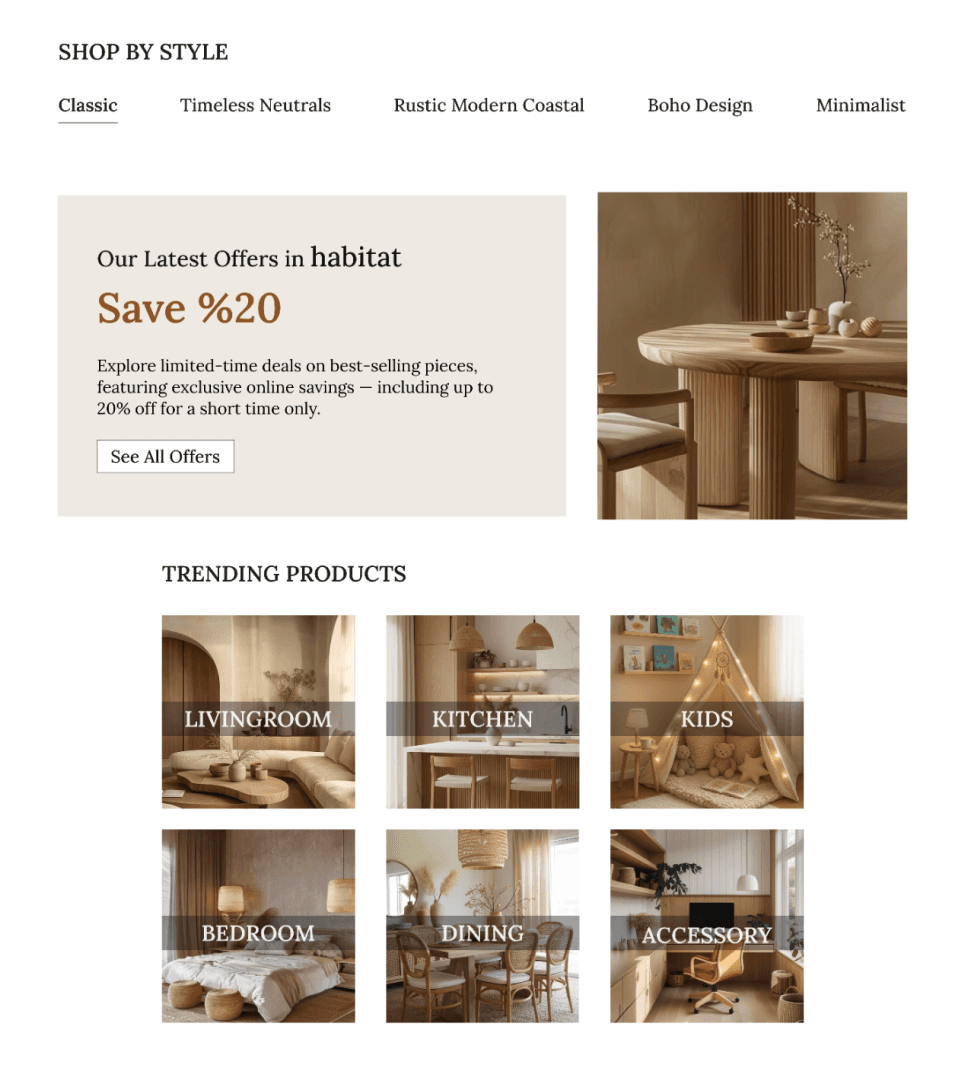
- Insight: Sections intended to highlight trending items and best-selling products were visually inconsistent and poorly structured.
- Action: The homepage now features two redesigned, visually engaging sections with balanced card layouts, consistent image quality, and clean typography.
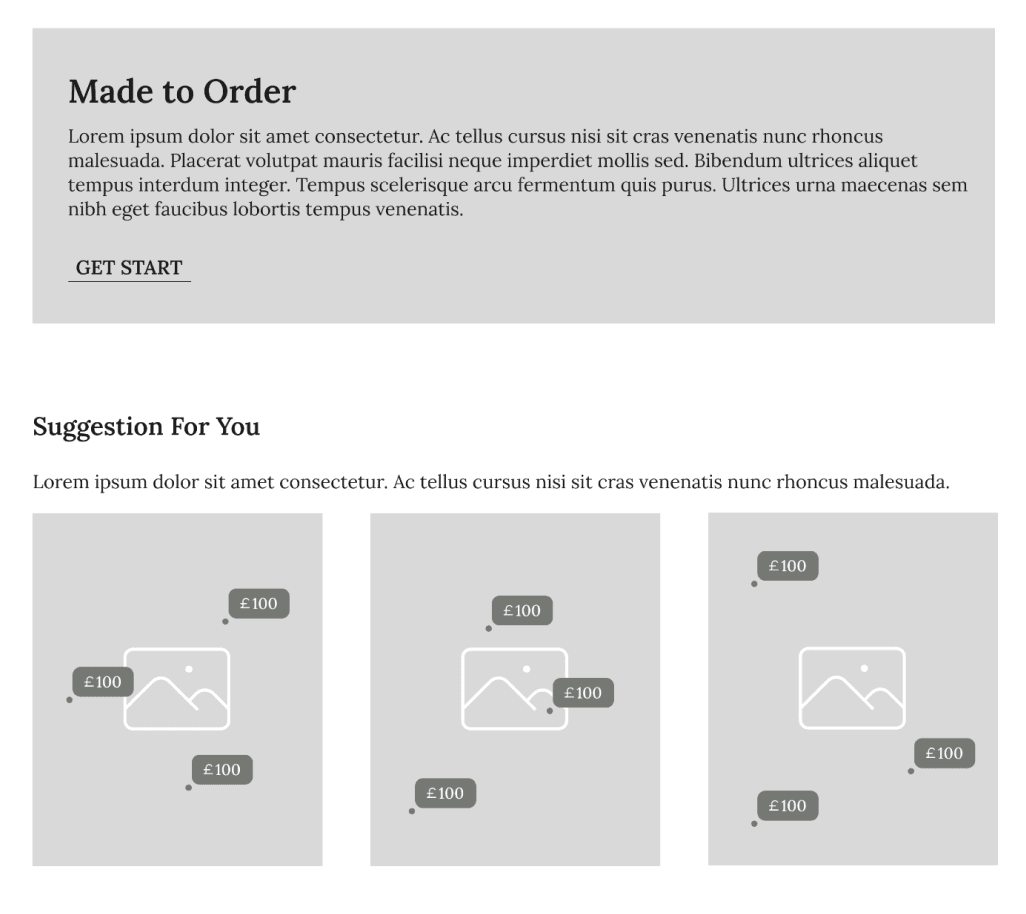
4. Add Practical Section as 'Suggestion For You'
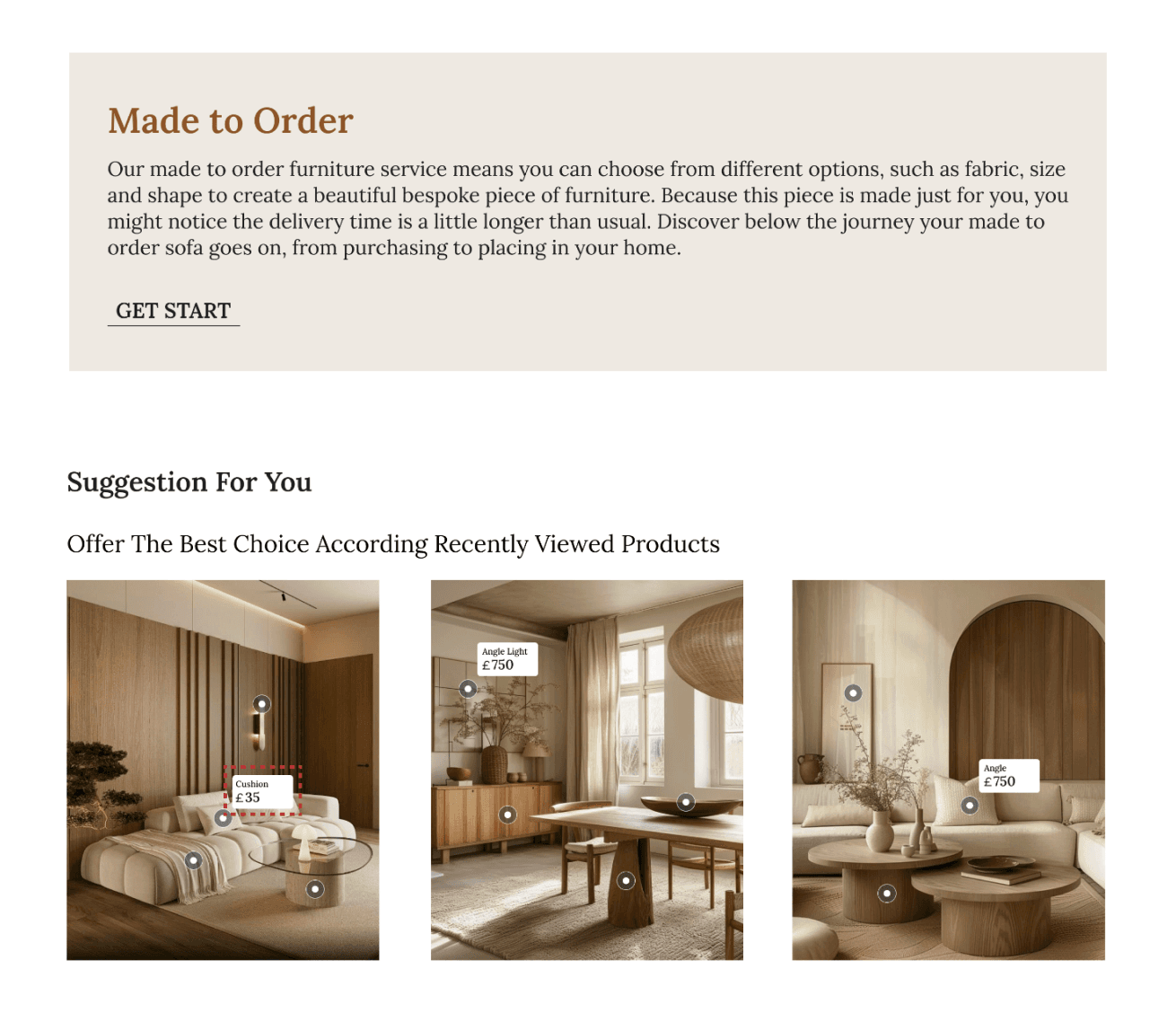
- Insight: Users expected to see a curated product suggestion section on the homepage.
- Action: A "Suggestions for You" section was added to highlight popular products with hover interactions.
5. Highlighting 'Made To Order' as a opportunity
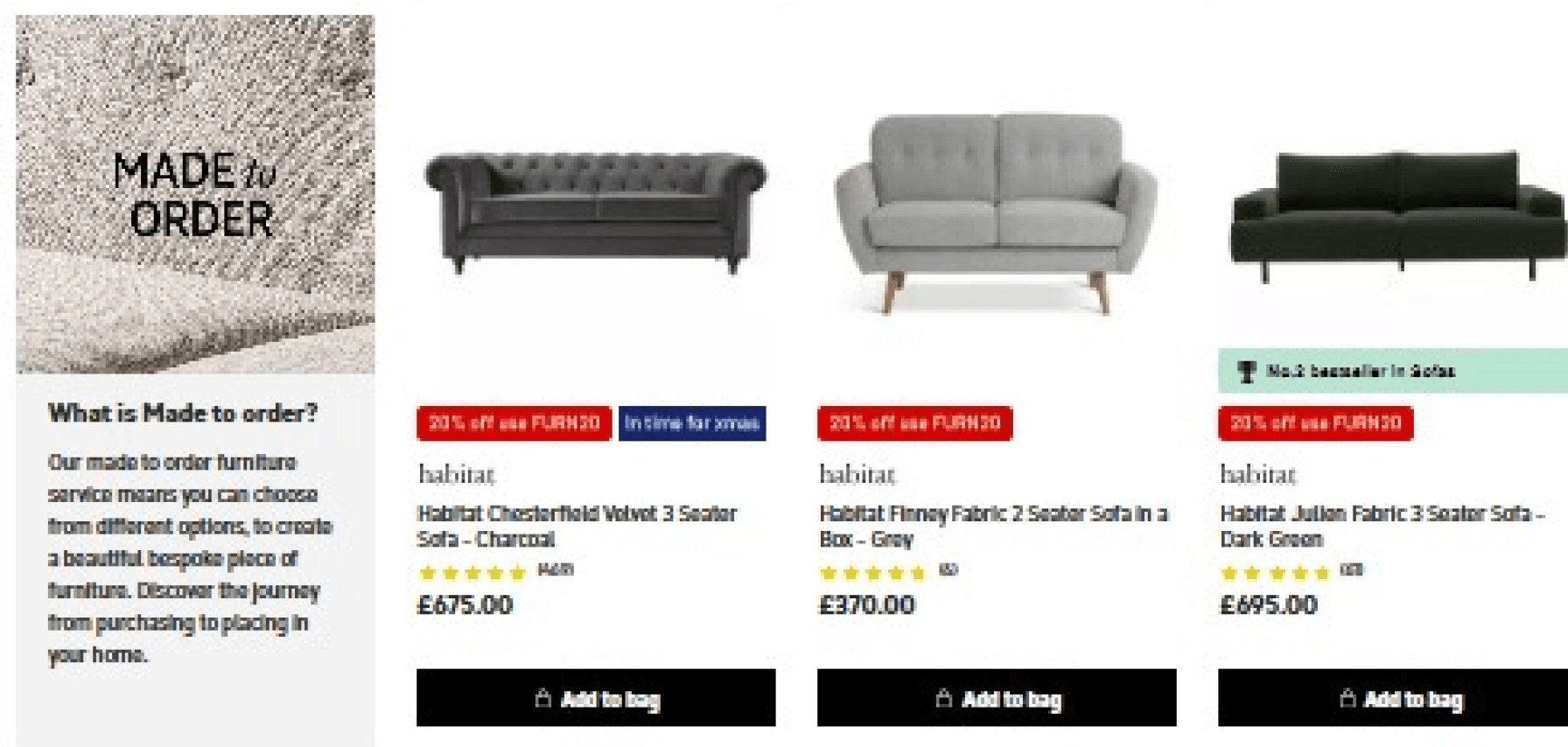
- Insight: Users often overlooked the "Made to Order" capability.
- Action: A dedicated Made to Order button was added on the homepage with a brief explanatory text.
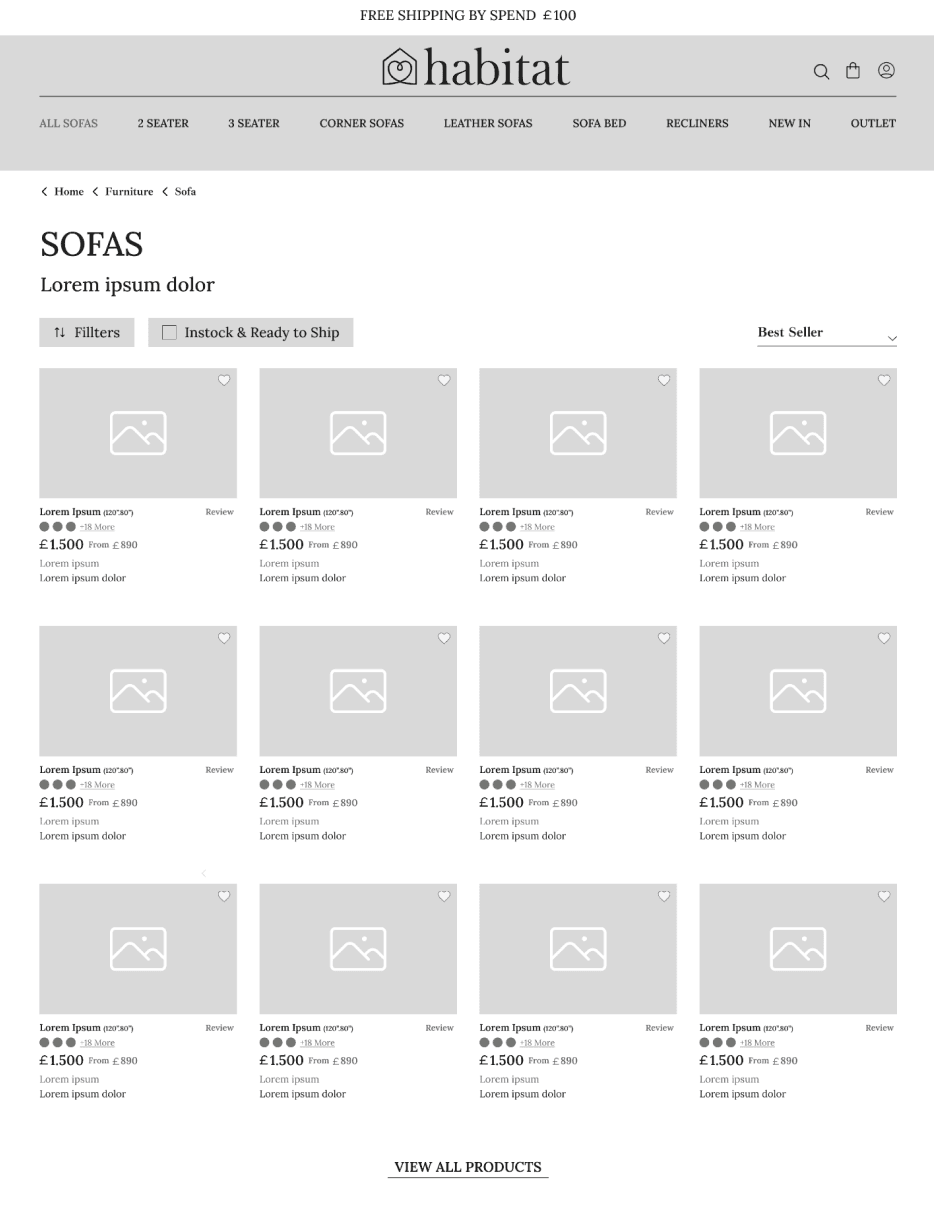
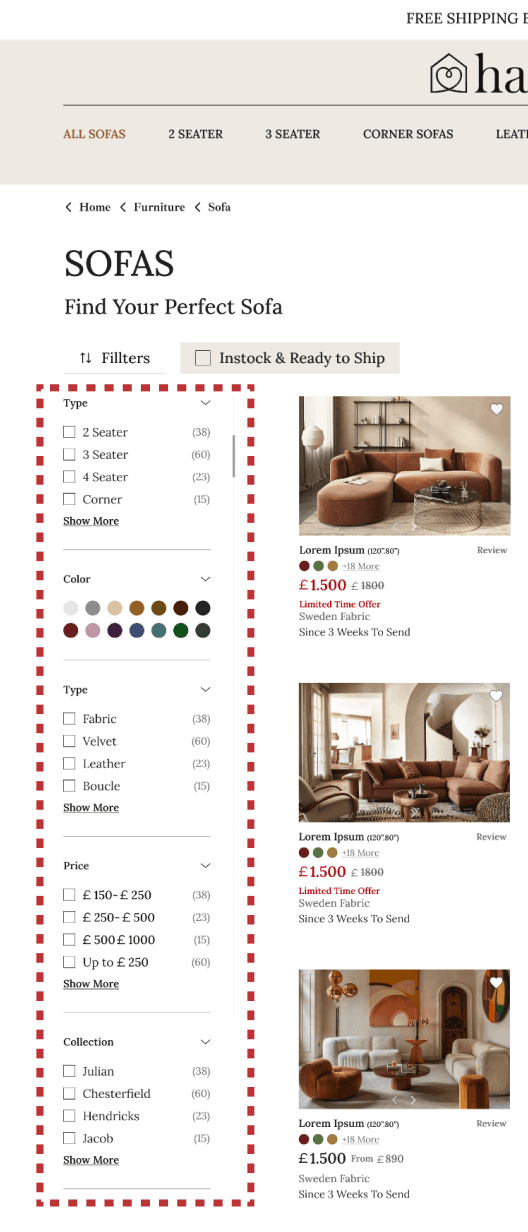
6. Improved Category Browsing & Side-by-Side Product Visibility
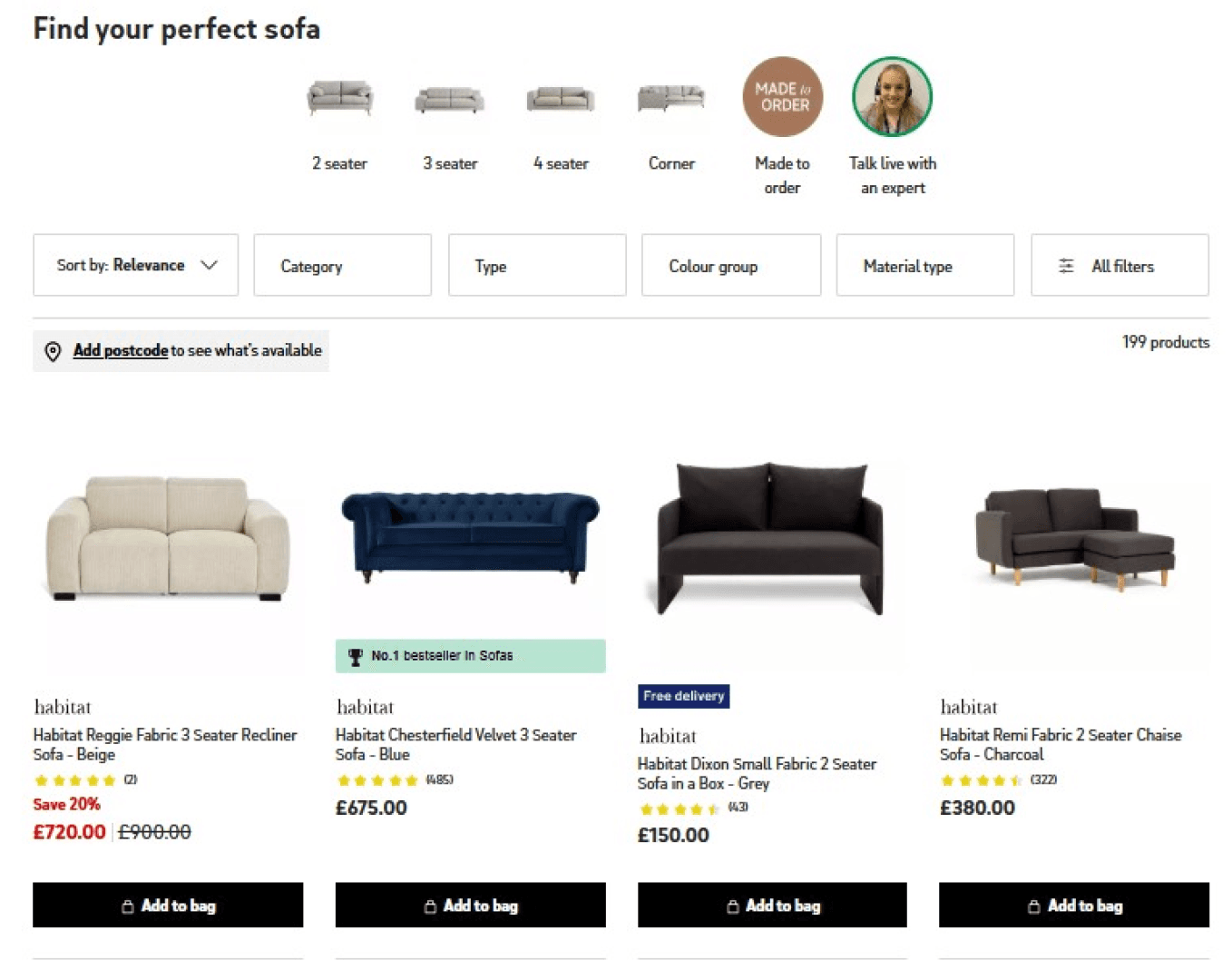
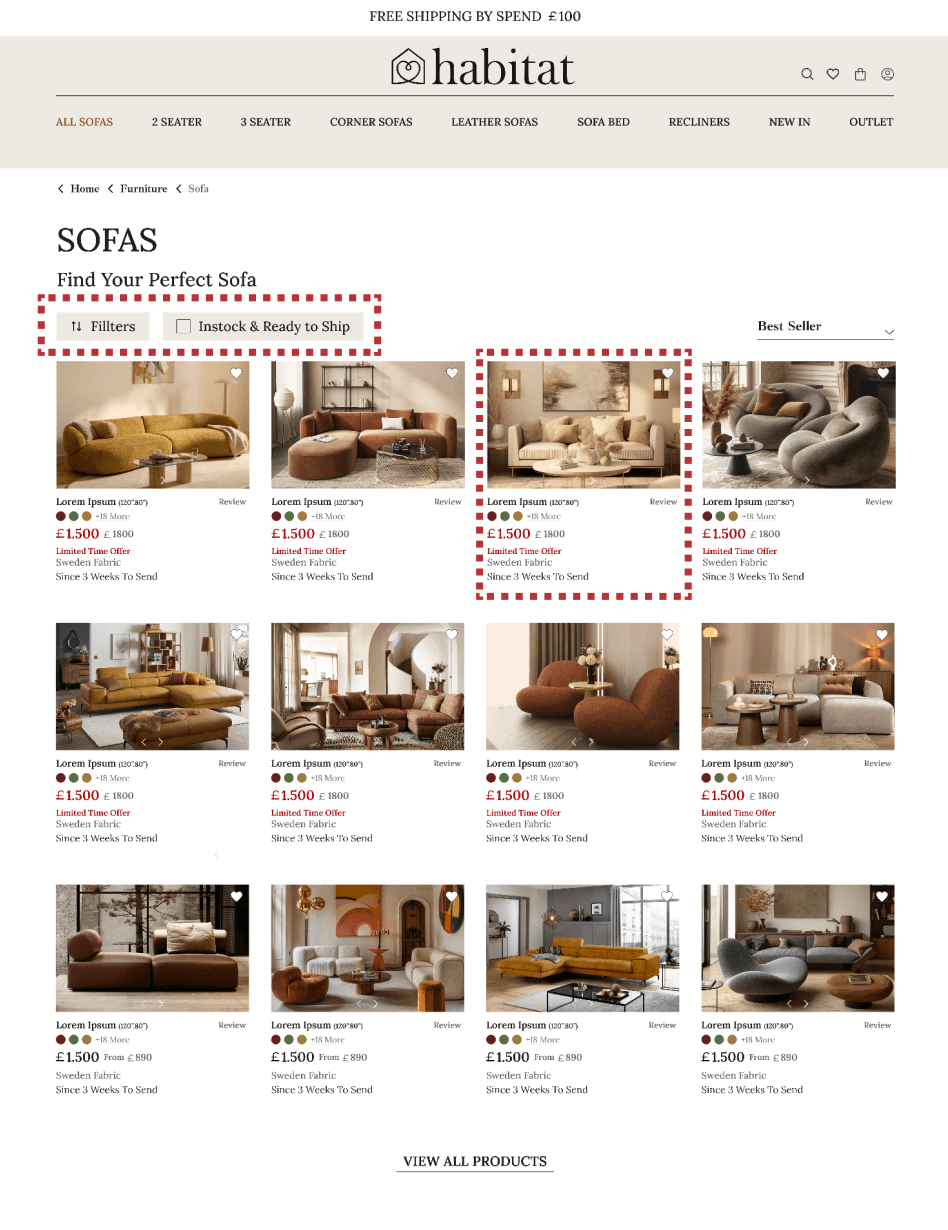
- Insight: Users struggled to compare multiple products at a glance. Images were small and details limited.
- Action: Enhanced category-level product visibility with larger, high-quality product cards and expanded filtering categories.
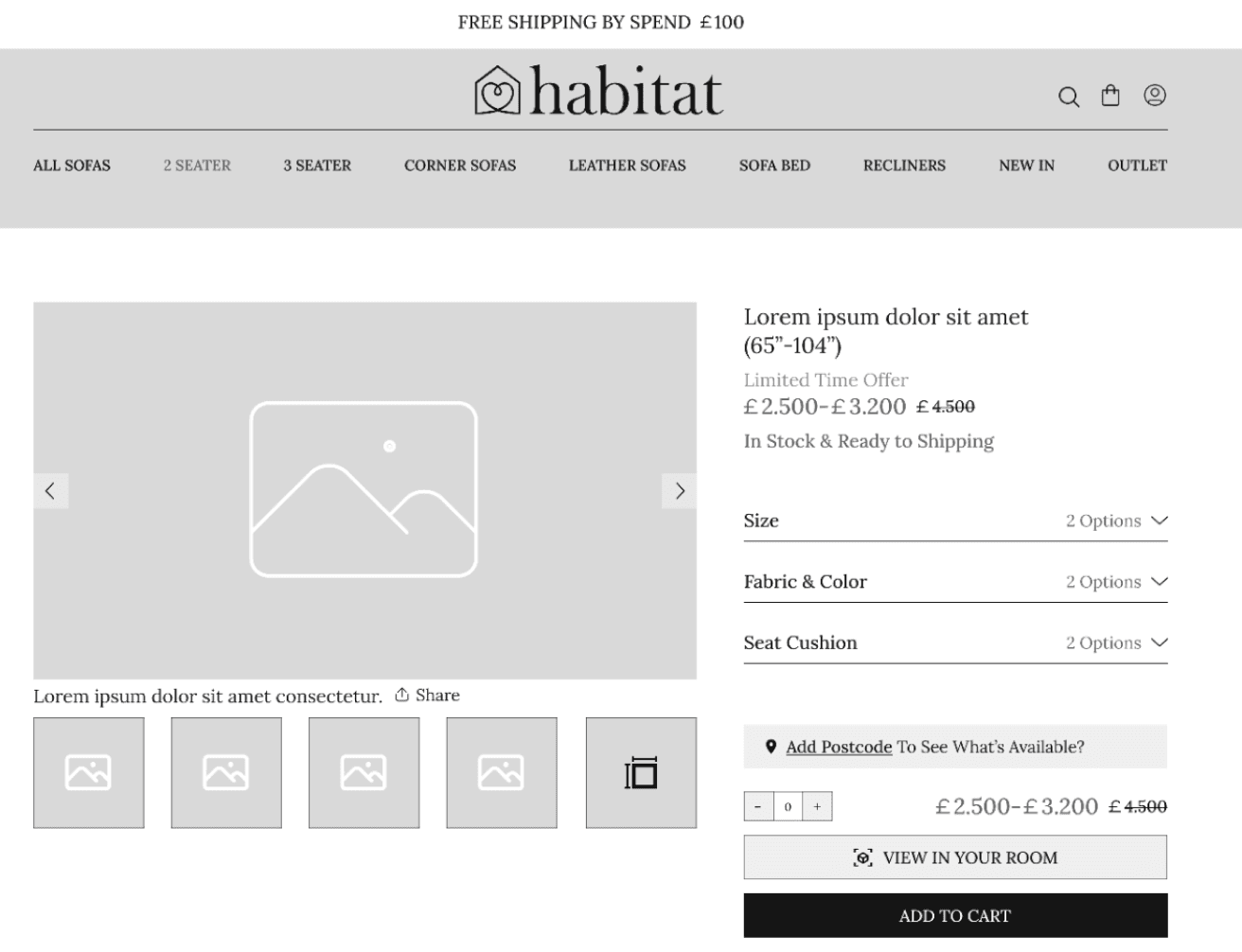
7. Enhanced Product Details & High-Quality Imagery
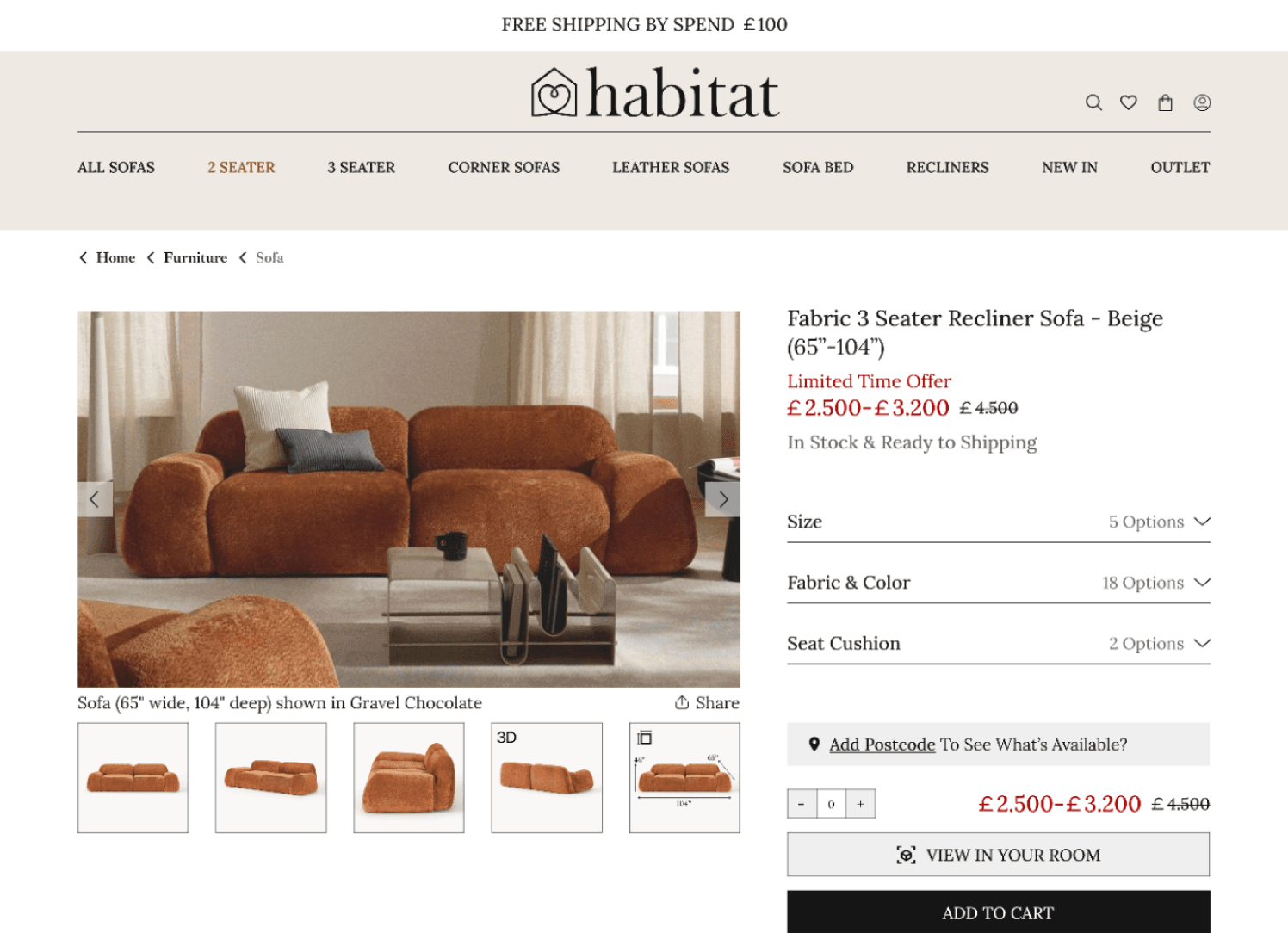
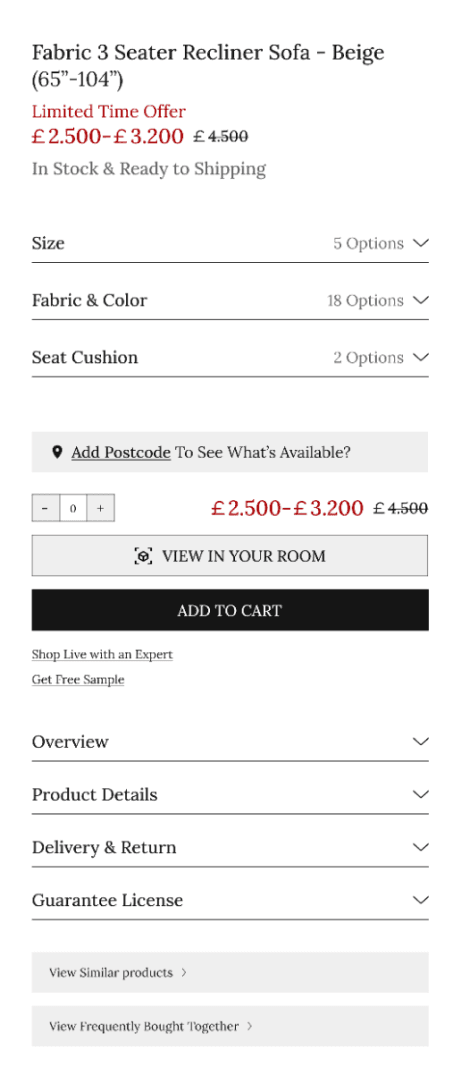
- Insight: Users struggled to make confident purchase decisions due to limited product information and small images.
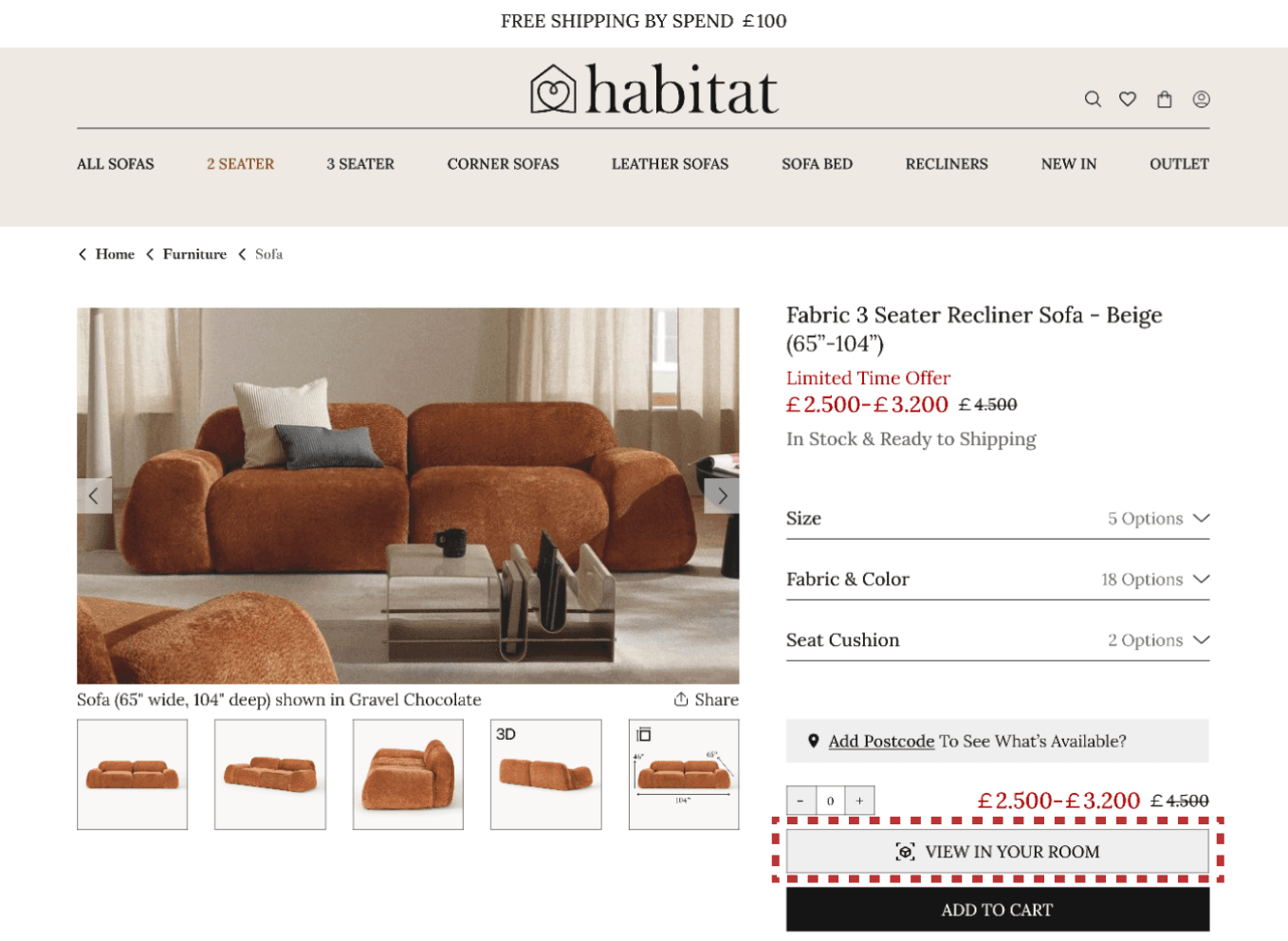
- Action: Improved product clarity with larger, high-resolution images, 3D visualization, and clearly accessible dimensions.
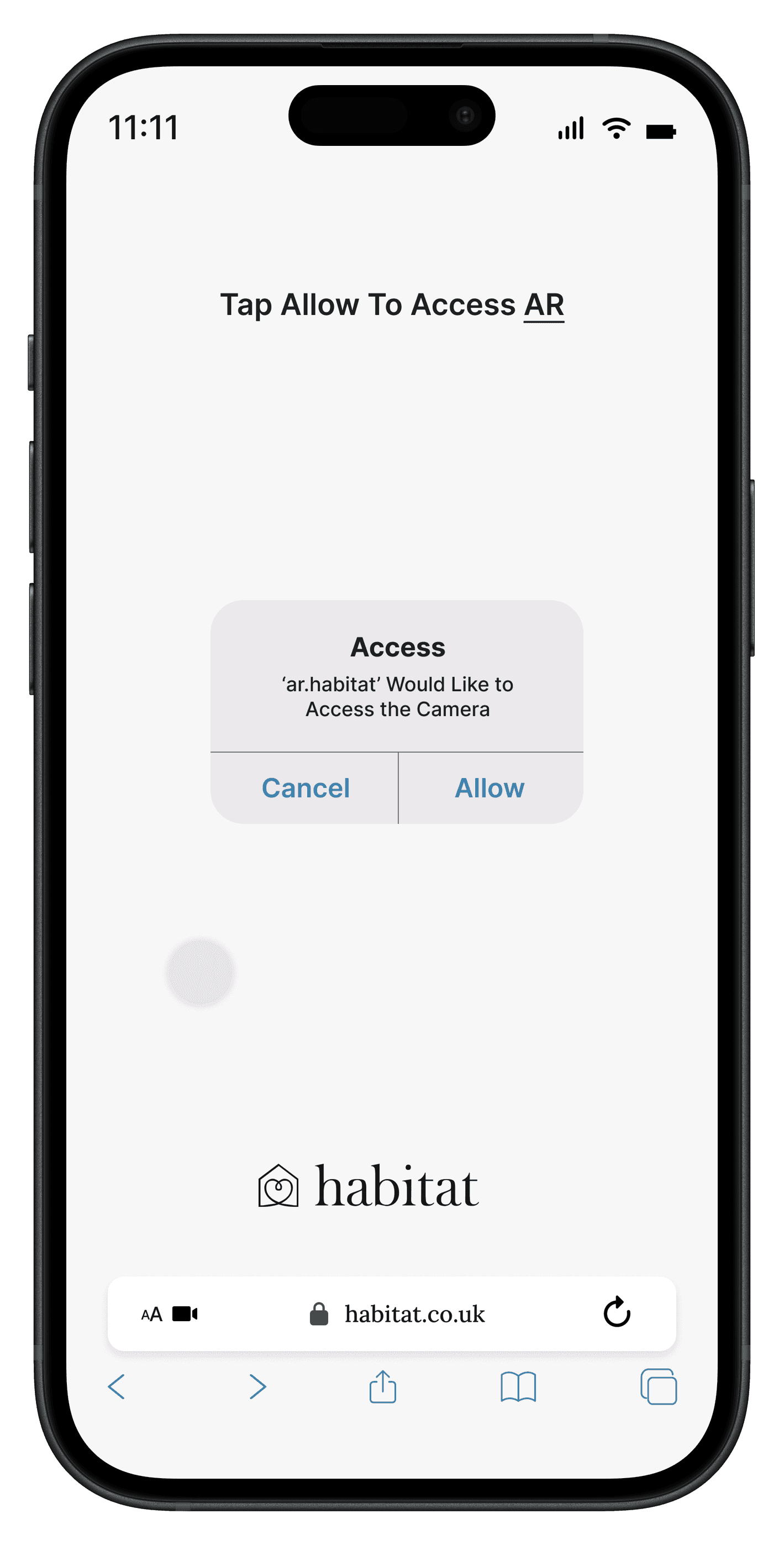
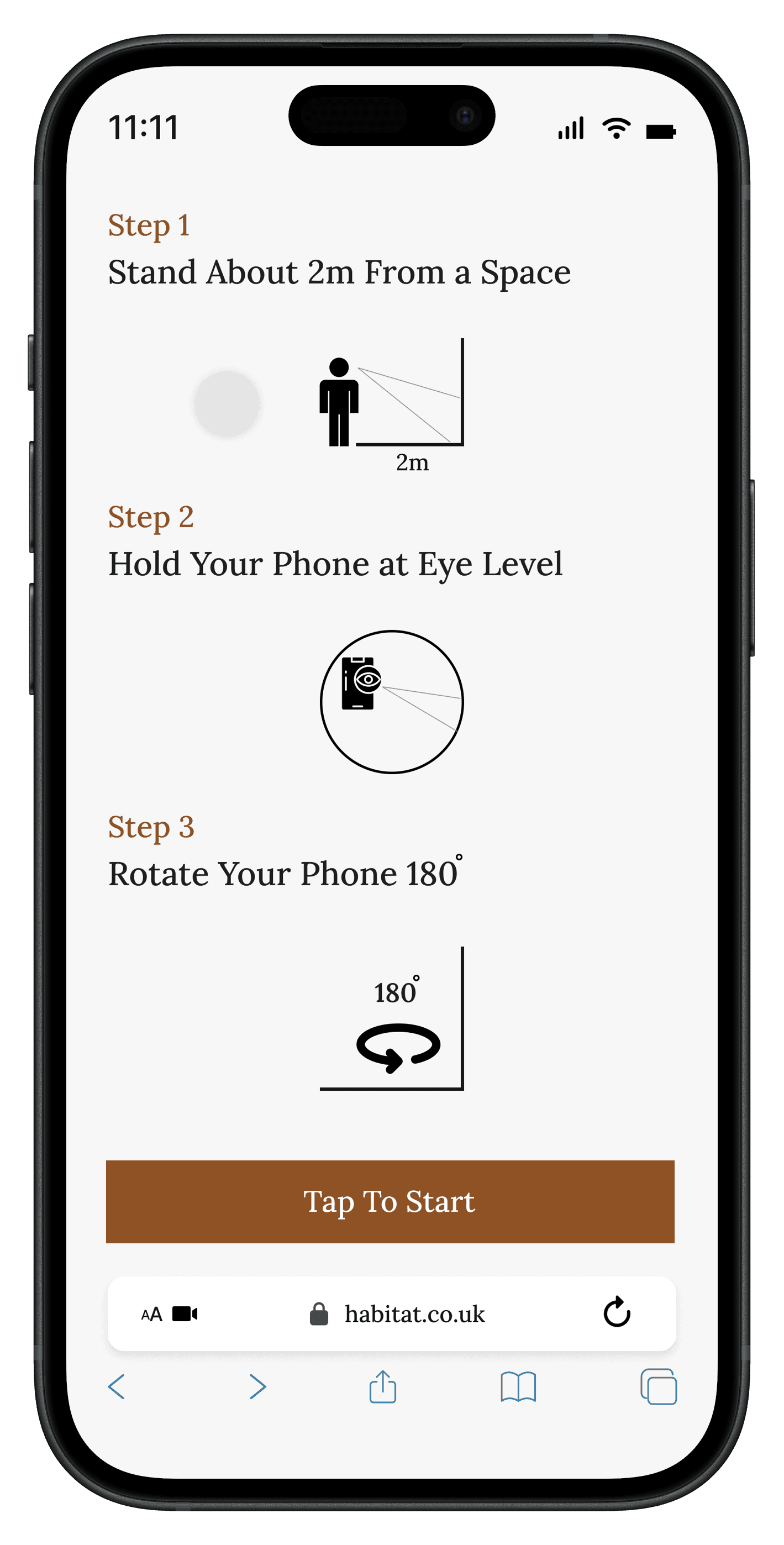
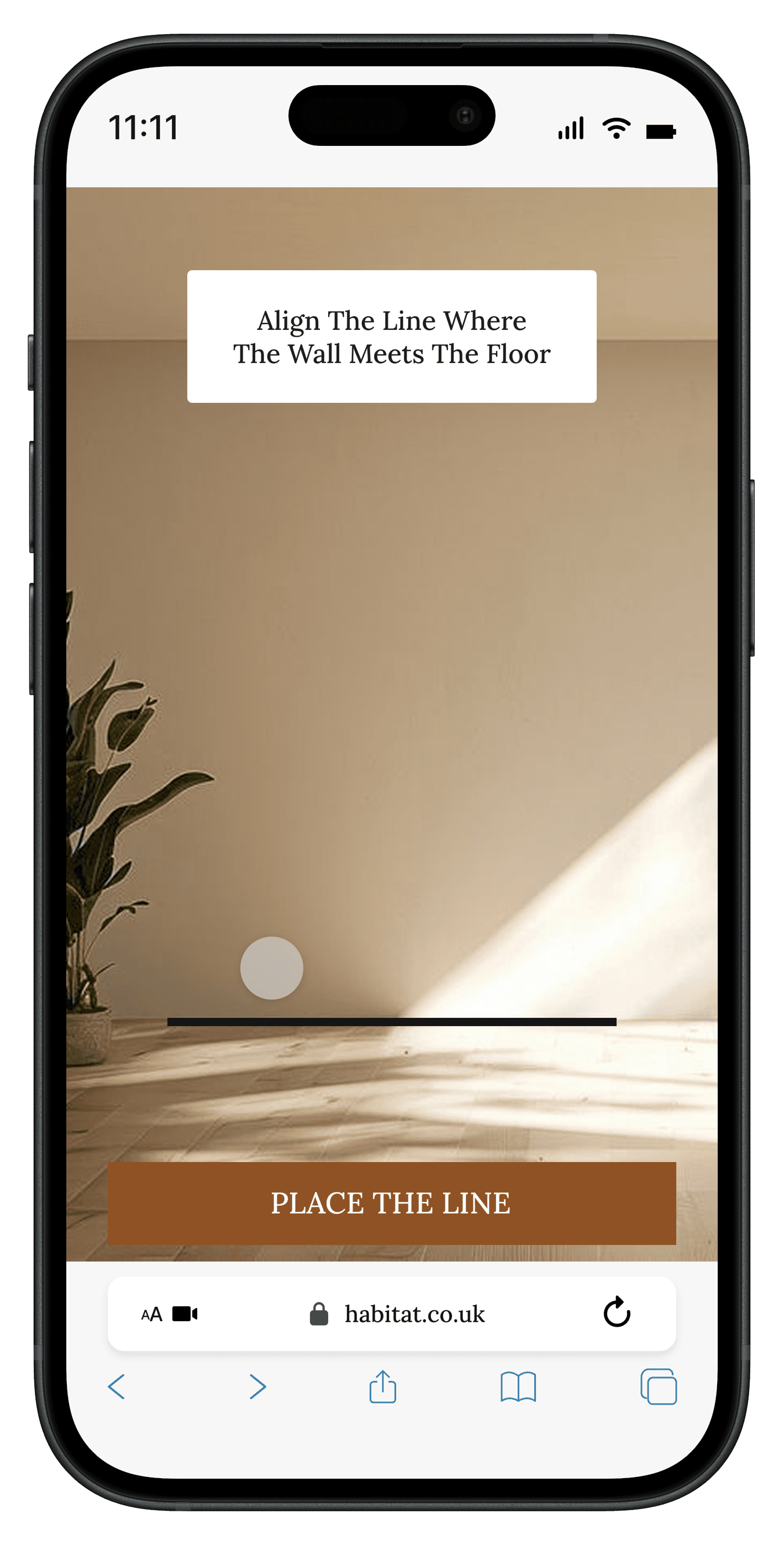
8. Augmented Reality Visualization
- Insight: Users struggled to assess how furniture would fit into their space.
- Action: An AR viewing feature was introduced to virtually place products in real space.
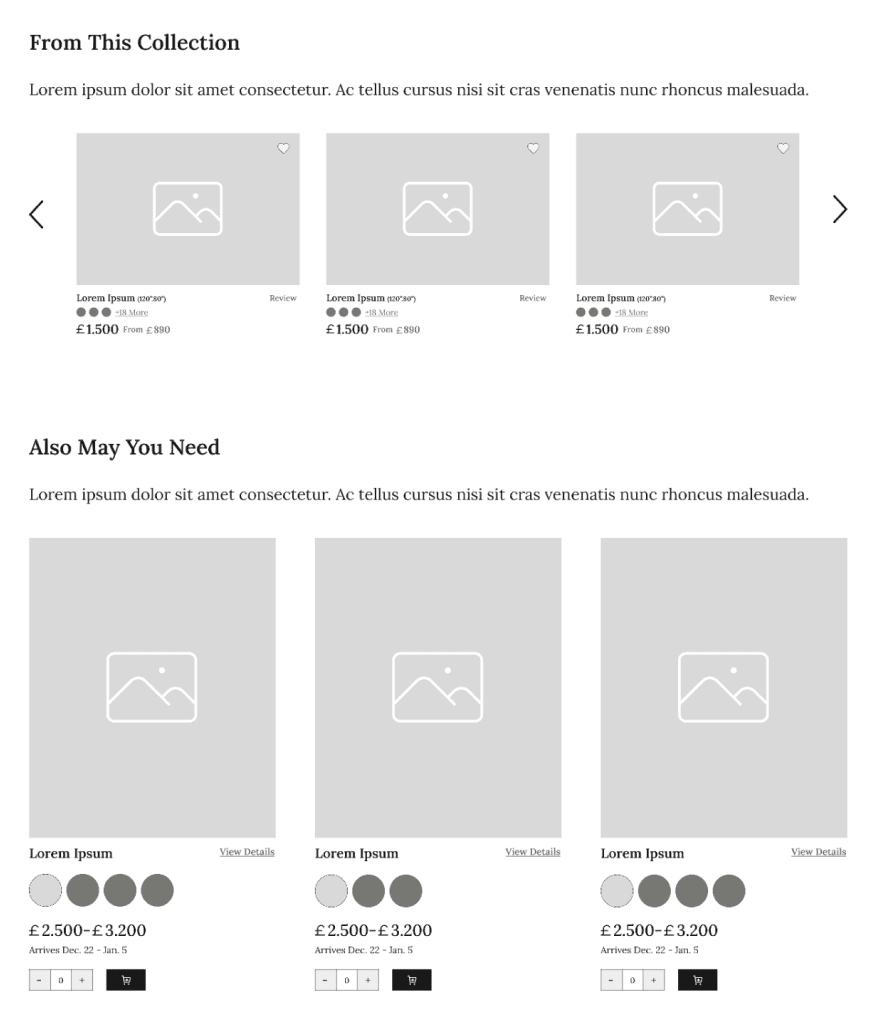
9. Collection & Accessories Enhancement
- Insight: Users hesitated when deciding whether to purchase additional items alongside their selected product.
- Action: Added "From This Collection" and "Also May You Need" sections to the product detail page.
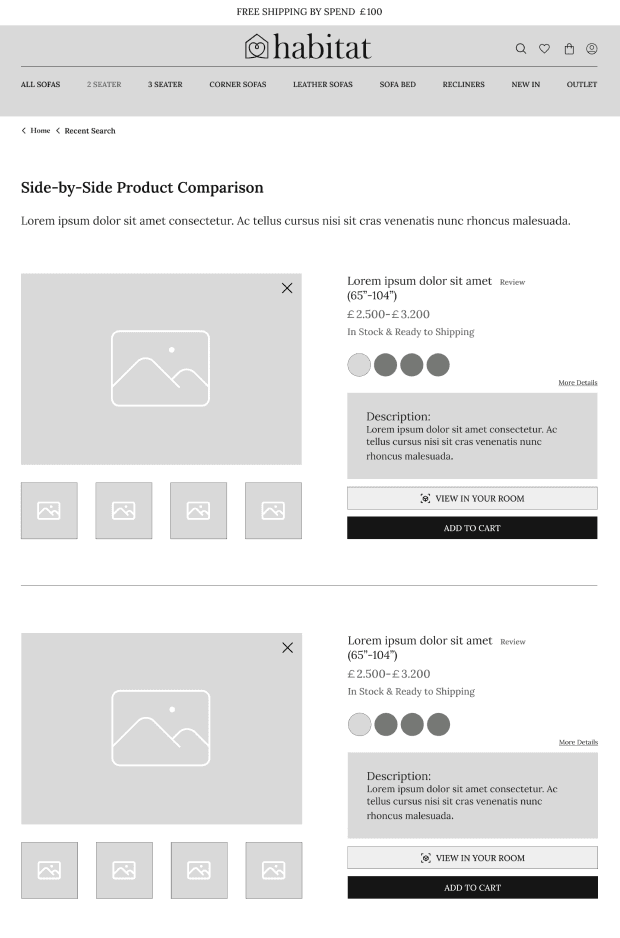
10. Product Comparison Experience
- Insight: Users couldn't easily compare multiple items.
- Action: Built a comparison tool within the Recently Viewed section.
11. Visual Consistency & Trust-Building Enhancements
- Insight: Inconsistent UI components and missing trust signals created doubt.
- Action: Standardized typography, spacing, and color system across all pages.
12. Streamlined Shopping & Checkout Flow
- Insight: Fragmented steps slowed down the purchase process.
- Action: Simplified checkout screens and clarified calls-to-action.
Branding and Visual Design
Typography: The Lora typeface was chosen for its modern yet elegant character, contributing to a clean visual identity.
Colors & Shapes: A restrained color system built around black, white, and gray with accent color #8E5225.
Button: Buttons were designed with a modern and minimal style to ensure clarity and consistency.
Habitat Redesign – Insights & Actions
1. Stronger Hero Image & First-Point Engagement
- Insight: The homepage hero lacked visual impact, clarity, and meaningful entry points, causing users to scroll without direction.
- Action: Designed a bold, high-quality hero section featuring large imagery, clear value propositions, seasonal highlights, and direct CTAs. This instantly guides users into key product categories and improves first-impression engagement.
2. Clearer Information Architecture & Navigation
- Insight: Users struggled to locate essential categories, leading to confusion and long discovery times.
- Action: Rebuilt the header navigation with logical grouping, clearer labels, and a more intuitive category structure. Added refined filtering and sorting to make product discovery faster and more seamless.
3. Enhanced Best Seller Offers & Trending Products Section
- Insight: In the previous design, sections intended to highlight trending items and best-selling discounted products were visually inconsistent and poorly structured. Oversized, low-quality images and cluttered layouts reduced clarity, making it difficult for users to quickly understand what was being offered. As a result, high-interest product groups were not being effectively surfaced, and users often overlooked them.
- Action: The homepage now features two redesigned, visually engaging sections: a curated Trending Products module that improves quick product discovery through clear categorization, and a refined Best-Selling Deals section designed with strong visual hierarchy and well-defined CTAs. Both areas use balanced card layouts, consistent image quality, improved spacing, and clean typography to guide attention without overwhelming the user. These enhancements make priority content easier to notice, faster to browse, and more enjoyable to interact with.
4. Add Practical Section as 'Suggestion For You'
- Insight: Usability testing revealed that users expected to see a curated product suggestion section on the homepage, and the absence of such a section made it harder for them to quickly discover popular or recommended items.
- Action: A "Suggestions for You" section was added to the homepage to highlight popular products within a clean, visually focused layout. Each product is marked with a subtle visual indicator, allowing users to hover over the marker to reveal key details such as product name and price. This interaction supports lightweight exploration while keeping the interface uncluttered, and enables users to navigate to the product detail page for further actions, including adding items to the cart.
5. Highlighting 'Made To Order' as a opportunity
- Insight: Usability testing showed that users often overlooked the "Made to Order" capability because it was displayed only as small labels on busy product pages. As a result, they did not realize they could customize the fabric, size, or shape of a product to create a piece tailored to their preferences.
- Action: To increase visibility, a dedicated Made to Order button was added on the homepage with a brief explanatory text. This draws attention to the personalization feature, clearly signaling it as a key value proposition without overwhelming the user with all available options at once.
6. Improved Category Browsing & Side-by-Side Product Visibility
- Insight: While browsing category pages (e.g., sofas), users struggled to compare multiple products at a glance. Images were small, details were limited, filters were weak, and there was no easy way to favorite or evaluate options without opening several pages. This slowed exploration and made decision-making overwhelming.
- Action: Enhanced category-level product visibility by introducing larger, high-quality product cards that display essential information upfront—color options, reviews, materials, and pricing. Added a "favorite" option for saving items, expanded filtering categories for faster refinement, and improved grid layout for clearer visual scanning. Each product now includes multiple thumbnail images directly on the browsing page, helping users evaluate style and features before entering the product page.
7. Enhanced Product Details & High-Quality Imagery
- Insight: Usability testing revealed that users struggled to make confident purchase decisions across the website—particularly on product and purchase-related pages. Limited product information, small or low-quality images, and the absence of clear dimensions made it difficult for users to fully evaluate products, increasing hesitation at critical decision points.
- Action: To address this, I improved product clarity throughout the website, with a strong focus on the product and purchase flow. Enhancements included larger, high-resolution images in multiple views, 3D product visualization, clearly accessible precise dimensions, and a simplified interface for switching colors and materials. These changes ensured that all essential product details were available exactly when users needed them during the buying process.
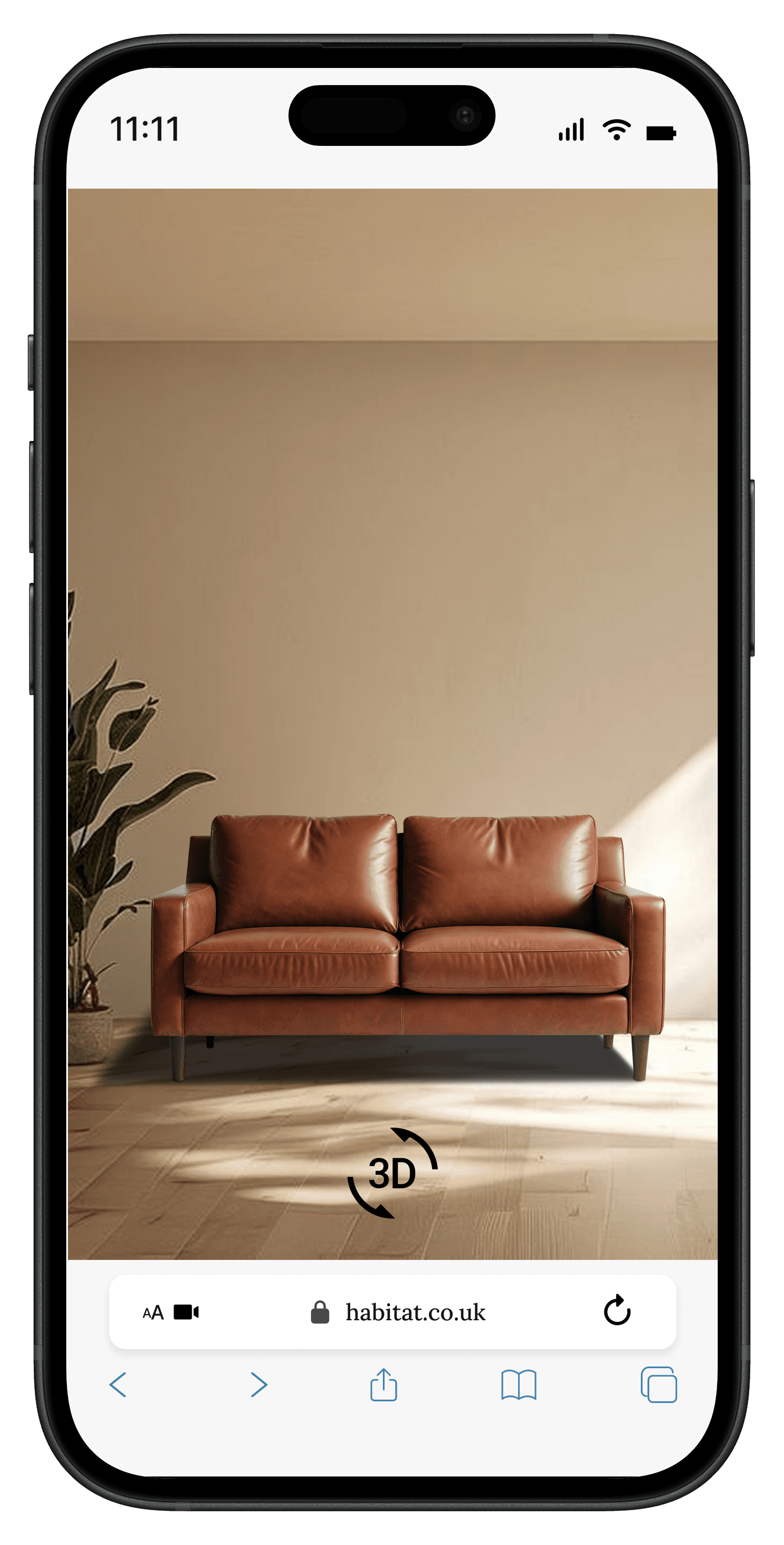
8. Augmented Reality Visualization
- Insight: Usability testing showed that users struggled to confidently assess how a piece of furniture would fit into their space. Participants frequently expressed uncertainty about size, proportions, and visual harmony with existing interiors, even after reviewing product images and dimensions. This uncertainty often delayed purchase decisions or led users to leave the product page to seek additional reassurance.
- Action: To reduce uncertainty and support confident decision-making, an Augmented Reality (AR) viewing feature was introduced. This allows users to virtually place the product in their own space and view it at real scale, directly from the product detail page. By enabling spatial visualization in a familiar environment, users can better evaluate fit, style compatibility, and placement before purchasing.
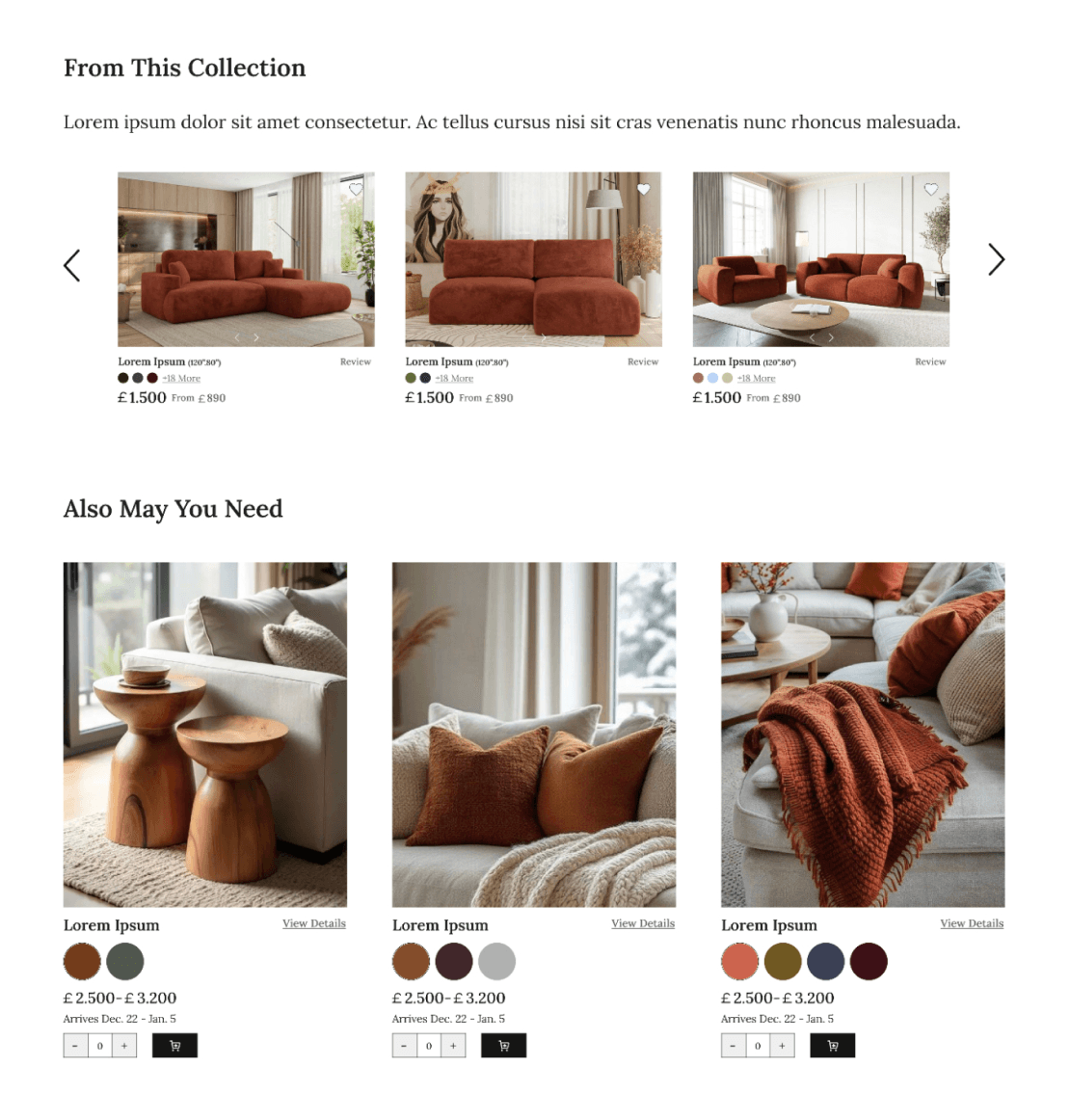
9. Collection & Accessories Enhancement
- Insight: Usability testing revealed that users frequently hesitated when deciding whether to purchase additional items alongside their selected product. They expressed difficulty in discovering other products within the same collection and often missed complementary accessories unless navigating away from the product page. Users preferred being able to view, customize, and add related items to the cart directly, without interrupting their shopping flow.
- Action: To address these pain points, two sections were added to the product detail page: a. From This Collection – Showcases other items from the same collection, helping users explore coordinated options effortlessly. b. Also May You Need – Highlights complementary accessories with options to adjust color, quantity, and add to cart in-place, reducing friction and streamlining multi-item purchases. These improvements directly respond to user behavior observed during testing, making the shopping experience more intuitive and encouraging combination purchases.
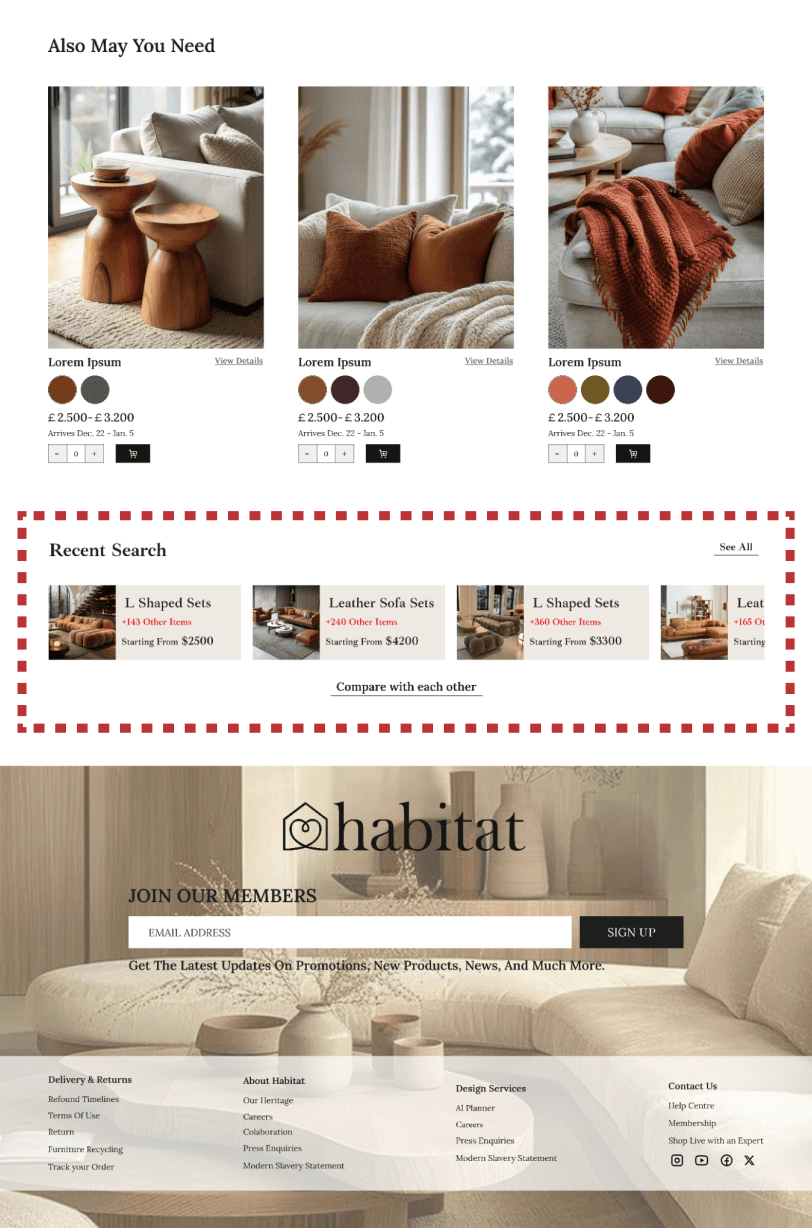
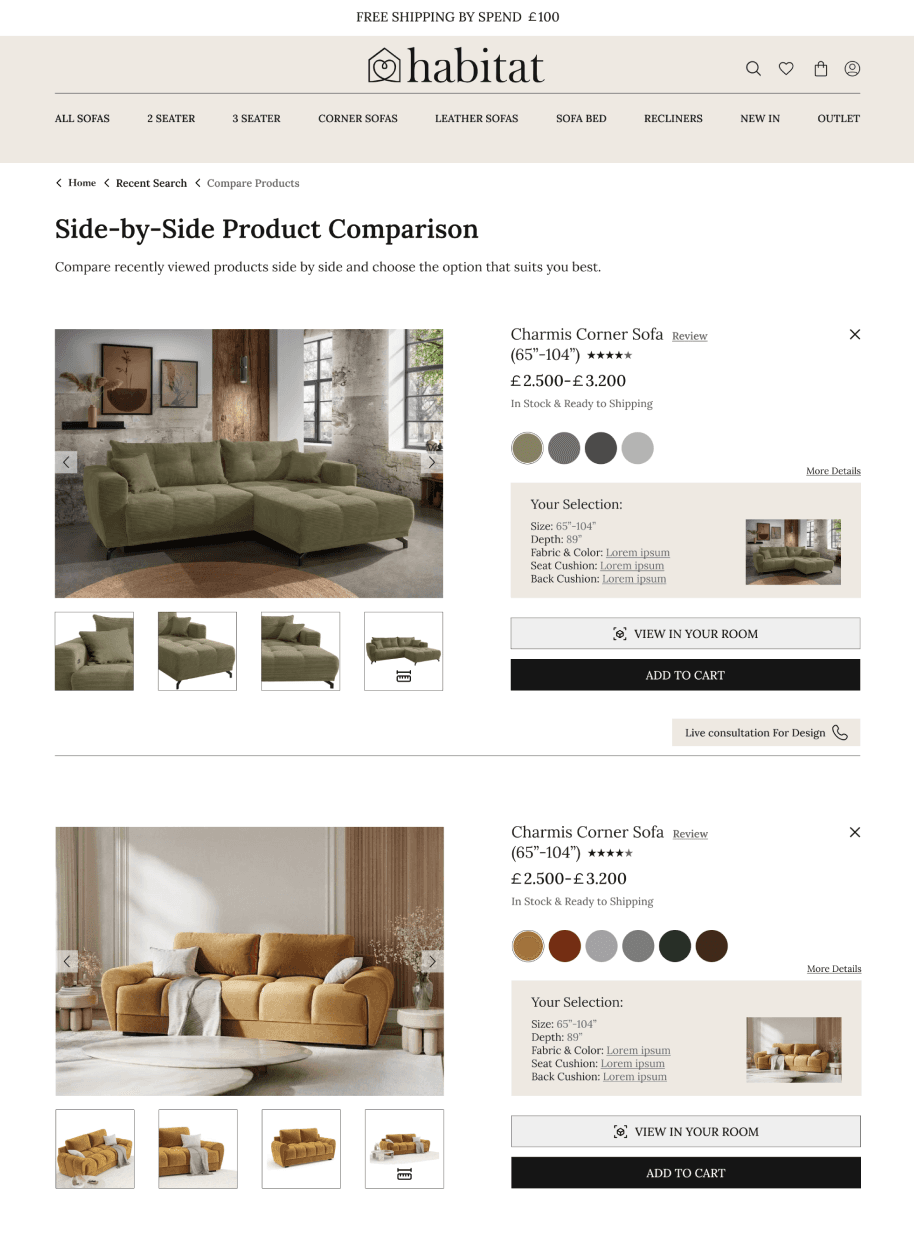
10. Product Comparison Experience
- Insight: Users couldn't easily compare multiple items, leading to decision fatigue.
- Action: Built a comparison tool within the Recently Viewed section, enabling users to compare products side-by-side, remove items, and add preferred options directly to the cart.
11. Visual Consistency & Trust-Building Enhancements
- Insight: Inconsistent UI components and missing trust signals created doubt during the buying journey.
- Action: Standardized typography, spacing, color system, and UI patterns across all pages. Highlighted reviews, shipping details, return policies, and product material quality to build transparency and user trust.
12. Streamlined Shopping & Checkout Flow
- Insight: Fragmented steps and unclear hierarchy slowed down the purchase process.
- Action: Simplified checkout screens, clarified calls-to-action, enabled saving favorites, and added related-item recommendations to maintain flow and reduce friction.
Branding and Visual Design
Typography: The Lora typeface was chosen for its modern yet elegant character, contributing to a clean and refined visual identity. Its readability and balanced proportions support a smooth browsing experience while enhancing the overall aesthetic of the website.
Colors & Shapes: A restrained color system was applied, built around black, white, and shades of gray to maintain visual simplicity. A single accent color, #8E5225, was introduced to draw attention to key elements and add warmth without disrupting the minimalist interface.
Button: Buttons were designed with a modern and minimal style to ensure clarity and consistency across the UI. Their simplified form supports clear call-to-action hierarchy while keeping the overall interface clean and focused on the products.
Reflection
- This project emphasized the value of thoughtful simplicity in e-commerce design. One of the key challenges was creating visual clarity while presenting a wide range of products without overwhelming the user.
- By grounding design decisions in usability insights, the focus remained on reducing friction, improving discoverability, and supporting confident decision-making. Each interaction and visual element was intentionally designed to serve a clear purpose rather than add decorative complexity.
- If extended further, the next step would be to validate the redesign through usability testing and iterate based on behavioral data. Overall, this project reinforced the importance of balancing aesthetics, functionality, and user needs to create meaningful digital experiences.
Outcome
- After several rounds of iteration and usability testing, the final redesign achieved a notable improvement in user engagement and satisfaction, with qualitative feedback suggesting that approximately 60% of test participants found product discovery easier and decision-making more confident. Features such as "From This Collection", "Also May You Need", and the dedicated Made to Order section were highlighted as key contributors to a smoother and more intuitive shopping experience.
- The project demonstrates that an iterative, insight-driven approach can significantly enhance usability and visual clarity, making the website more appealing and effective for users.